---
title: Additional Form Settings
description: The “Additional Form Settings” tab allows you to add settings for your JS Form, such as unsubscribe links, Private Policy links, and redirect links.
---
[Skip to content](https://support.phonexa.com/additional-form-settings#main-content)
[](https://support.phonexa.com/?hsLang=en)
Open main navigation
Close main navigation
- [➜\]](https://phonexa.com/)
[➜\]](https://phonexa.com/?hsLang=en)
Phonexa Support Center
- There are no suggestions because the search field is empty.
1. [Knowledge Base](https://support.phonexa.com/?hsLang=en)
2. [General information](https://support.phonexa.com/general-information?hsLang=en)
3. [Product Customization](https://support.phonexa.com/general-information?hsLang=en#product-customization)
# Additional Form Settings
## The “Additional Form Settings” tab allows you to add settings for your JS Form, such as unsubscribe links, Private Policy links, and redirect links.
To view the settings, go to the **System Management \> Products** section, select the Product to configure, and go to the **“Additional Form Settings”** tab.
*Note: The list of displayed fields and options depends on the Product.*
*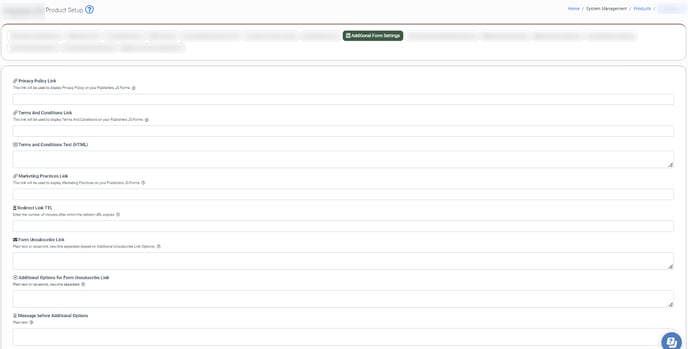*
- **Privacy Policy Link:** Add a link to the Privacy Policy to display in your JS Form.
- **Terms And Conditions Link:** Add a link to the Terms And Conditions to display in your JS Form.
- **Terms and Conditions Text (HTML):** Enter the HTML code for the Terms and Conditions that will be displayed in your JS Form.
- **Marketing Practices Link:** Add a link to the Marketing Practices that will be used in your JS Form.
- **Redirect Link TTL:** Set the maximum time limit for the redirect link to be active. *Note: You can enter a value between 1 and 2880 minutes. Read more about this option in the “Redirect Link Lifetime” Knowledge Base* [*article*](https://support.phonexa.com/redirect-link-lifetime?hsLang=en)*.*
- **Form Unsubscribe Link:** Enter the URL (plain text or value=link) to add an unsubscribe link to your JS Form. The unsubscribe link will be removed from the form if the field is blank. If you have configured additional options for the form, each option should be added as a separate line. Example: ca=[http://unsubscribewebsite.com](http://unsubscribewebsite.com/)
- **Additional Options for Form Unsubscribe Link:** Enter the list of additional options (plain text or value=link) to display in the unsubscribe pop-up window. Each option should be added as a separate line. Example: ca=California.
- **Message before Additional Options:** Enter the text (plain text) that will be displayed in the unsubscribe pop-up window.
*Read more about the Global Unsubscribe feature in this Knowledge Base* [*article*](https://support.phonexa.com/global-unsubscribe?hsLang=en) *and “CCPA” Knowledge Base* [*article*](https://support.phonexa.com/ccpa?hsLang=en)*.*
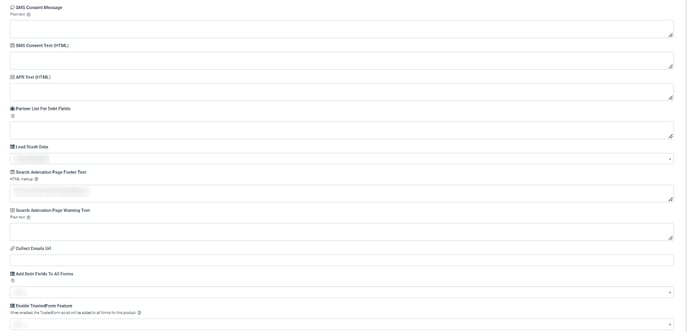
- **SMS Consent Message:** Enter the consent text that will be displayed next to the consent checkbox.
- **SMS Consent Text (HTML):** Enter the HTML code for the SMS consent text that will be displayed next to the checkbox.
- **APR Text (HTML):** Enter the HTML code.
- **Partner List For Debt Fields:** Add the list of partners that can be viewed through the link in the JS Form.
- **Lead Stash Data:** Select the lead stash that will be used for your JS Form.
- **Search Animation Page Footer Text:** Enter the HTML code for the search progress animation footer that will be displayed when the lead submits the JS form.
- **Search Animation Page Warning Text:** Enter the text for the search progress animation warning message that will be displayed when the lead submits the JS form.
- **Collect Emails Url:** Enter the URL for email collection.
- **Add Debt Fields To All Forms:** Select the **“Yes”** option to display additional fields in all JS Forms for this Product.
- **Enable TrustedForm Feature:** Select the “Yes” option to enable the TrustedForm Feature for all JS Forms for this Product.
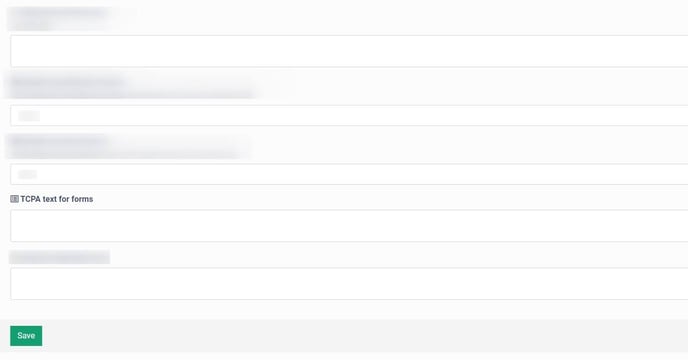
- **Copy-paste number to prevent re-apply:** Select the number of copy-paste actions applied on the form to prevent re-apply.
- **Enable Jornaya Feature:** Select the **“Yes”** option to enable the Jornaya feature for all JS Forms for this Product.
- **Script to add after form:** Enter your custom or third-party service JS script that will be added and executed in your JS form.
- ***TCPA text for forms:*** Enter a custom text to display it next to the **“Terms and Conditions”** checkbox in your JS Form. Also, this text will be added to the data sent by JS Form. *Note: This feature is available only for the* ***“Auto Insurance Ping Post (Conditional fields)”*** *Product.*
[**](https://support.phonexa.com/hubfs/unnamed-Dec-08-2023-04-39-29-9874-PM.png?hsLang=en)
[](https://support.phonexa.com/hubfs/unnamed%20(1)-1.png?hsLang=en)
[](https://support.phonexa.com/hubfs/add.%20form%20settings%202.jpg?hsLang=en)
- [General information](https://support.phonexa.com/general-information?hsLang=en#main-content)
- [Account Settings](https://support.phonexa.com/general-information?hsLang=en#account-settings)
- [Security Settings](https://support.phonexa.com/general-information?hsLang=en#security-settings)
- [Users](https://support.phonexa.com/general-information?hsLang=en#users)
- [System Customization](https://support.phonexa.com/general-information?hsLang=en#system-customization)
- [Project Customization](https://support.phonexa.com/general-information?hsLang=en#project-customization)
- [Product Customization](https://support.phonexa.com/general-information?hsLang=en#product-customization)
- [System Management](https://support.phonexa.com/general-information?hsLang=en#system-management)
- [Support](https://support.phonexa.com/general-information?hsLang=en#support)
- [LMS Sync & Call Logic](https://support.phonexa.com/lms-sync-call-logic?hsLang=en#main-content)
- [Extra Features](https://support.phonexa.com/lms-sync-call-logic?hsLang=en#extra-features)
- [Publisher Configuration](https://support.phonexa.com/lms-sync-call-logic?hsLang=en#publisher-configuration)
- [Client Management](https://support.phonexa.com/lms-sync-call-logic?hsLang=en#client-management)
- [System Logs](https://support.phonexa.com/lms-sync-call-logic?hsLang=en#system-logs)
- [Documents And References](https://support.phonexa.com/lms-sync-call-logic?hsLang=en#documents-and-references)
- [Reports and Analytics](https://support.phonexa.com/lms-sync-call-logic?hsLang=en#reports-and-analytics)
- [Publisher management](https://support.phonexa.com/lms-sync-call-logic?hsLang=en#publisher-management)
- [Call Logic Customization](https://support.phonexa.com/lms-sync-call-logic?hsLang=en#call-logic-customization)
- [Campaign Configuration](https://support.phonexa.com/lms-sync-call-logic?hsLang=en#campaign-configuration)
- [Feed CMS](https://support.phonexa.com/lms-sync-call-logic?hsLang=en#feed-cms)
- [Event Tracking](https://support.phonexa.com/lms-sync-call-logic?hsLang=en#event-tracking)
- [iClear](https://support.phonexa.com/lms-sync-call-logic?hsLang=en#iclear)
- [E-Delivery](https://support.phonexa.com/e-delivery?hsLang=en#main-content)
- [List Management](https://support.phonexa.com/e-delivery?hsLang=en#list-management)
- [Email Campaigns](https://support.phonexa.com/e-delivery?hsLang=en#email-campaigns)
- [SMS Campaigns](https://support.phonexa.com/e-delivery?hsLang=en#sms-campaigns)
- [Reports](https://support.phonexa.com/e-delivery?hsLang=en#reports)
- [Suppression Management](https://support.phonexa.com/e-delivery?hsLang=en#suppression-management)
- [Books360](https://support.phonexa.com/books360?hsLang=en#main-content)
- [Books 360 Integration](https://support.phonexa.com/books360?hsLang=en#books-360-integration)
- [Vendor Management](https://support.phonexa.com/books360?hsLang=en#vendor-management)
- [Account](https://support.phonexa.com/books360?hsLang=en#account)
- [Customer Management](https://support.phonexa.com/books360?hsLang=en#customer-management)
- [Opt-Intel](https://support.phonexa.com/opt-intel?hsLang=en#main-content)
- [List Management](https://support.phonexa.com/opt-intel?hsLang=en#list-management)
- [All Reports](https://support.phonexa.com/opt-intel?hsLang=en#all-reports)
- [Mailers](https://support.phonexa.com/opt-intel?hsLang=en#mailers)
- [Campaigns](https://support.phonexa.com/opt-intel?hsLang=en#campaigns)
- [System Management](https://support.phonexa.com/opt-intel?hsLang=en#system-management)
- [HitMetrix](https://support.phonexa.com/hitmetrix?hsLang=en#main-content)
- [Analytics](https://support.phonexa.com/hitmetrix?hsLang=en#analytics)
- [Heatmaps](https://support.phonexa.com/hitmetrix?hsLang=en#heatmaps)
- [System Management](https://support.phonexa.com/hitmetrix?hsLang=en#system-management)
- [Lynx](https://support.phonexa.com/lynx?hsLang=en#main-content)
- [Offers](https://support.phonexa.com/lynx?hsLang=en#offers)
- [LYNX Reports](https://support.phonexa.com/lynx?hsLang=en#lynx-reports)
- [Advertisers](https://support.phonexa.com/lynx?hsLang=en#advertisers)
- [Affiliates](https://support.phonexa.com/lynx?hsLang=en#affiliates)
- [Account Settings](https://support.phonexa.com/lynx?hsLang=en#account-settings)
- [Cloud PBX](https://support.phonexa.com/cloud-pbx?hsLang=en)
[](https://phonexa.com/?hsLang=en)
Phonexa Knowledge Base
Copyright © 2026, Phonexa