---
title: Bucket Bank
description: Check our short guide and learn how you can enable and use the Bucket Bank option to accumulate money on the publisher’s balance.
---
[Skip to content](https://support.phonexa.com/bucket-bank#main-content)
[](https://support.phonexa.com/?hsLang=en)
Open main navigation
Close main navigation
- [➜\]](https://phonexa.com/)
[➜\]](https://phonexa.com/?hsLang=en)
Phonexa Support Center
- There are no suggestions because the search field is empty.
1. [Knowledge Base](https://support.phonexa.com/?hsLang=en)
2. [LMS Sync & Call Logic](https://support.phonexa.com/lms-sync-call-logic?hsLang=en)
3. [Publisher management](https://support.phonexa.com/lms-sync-call-logic?hsLang=en#publisher-management)
# Bucket Bank
## Check our short guide and learn how you can enable and use the Bucket Bank option to accumulate money on the publisher’s balance.
**Bucket Bank** allows you to accumulate a certain amount of money on the publisher’s balance. In the interface, the leads will appear with a reject status (though in reality they could be sold and redirected), and only when the balance reaches the necessary amount, a sold status will appear.
*Find more details about Tracking URL configuration in the [Knowledge Base](https://support.phonexa.com/publisher-configuration-tracking?hsLang=en).*
To configure the **Bucket Bank** option, go to the **Publisher Management \> Publishers** section, select the Publisher, and click the “**View**” button in the “**Actions**” column. On the Publisher setup page, go to the “**Rev-Share**” tab and open the “**Bucket Bank**” section.[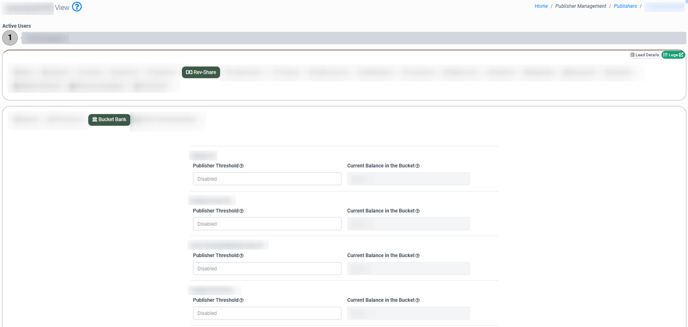](https://support.phonexa.com/hubfs/ksnip_20241223-115112-1.png?hsLang=en)
Select the product and in the **Publisher Thresholds** field enter the number of deductions to the buyer on which the tracking will be triggered. The “**Current Balance in the Bucket**” field displays the publisher’s current balance.
To **disable** the Bucket Bank option remove the threshold value.
To **track money** when using Bucket Bank you need to configure the Tracking URL to the Lead Sold event.
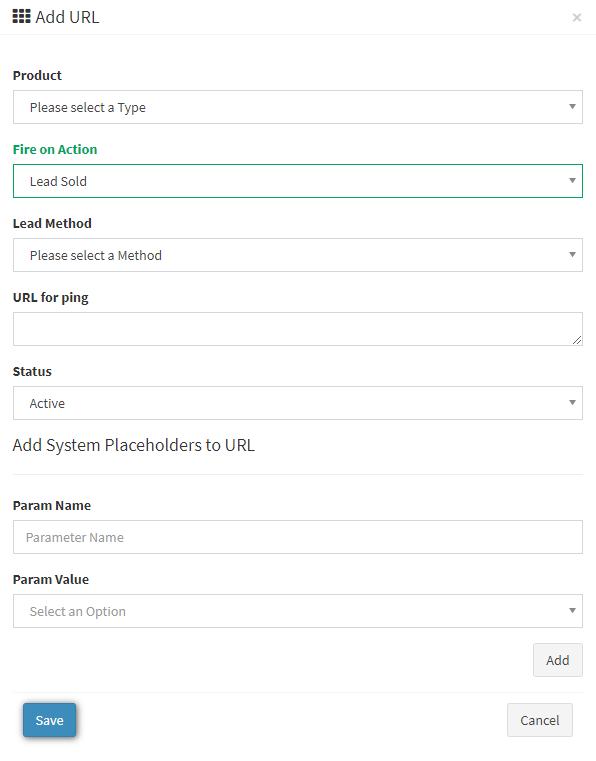
To set up the Tracking URL go to the **Publisher Management \> Publishers** section, select the Publisher, and click the “**View**” button in the “**Actions**” column. On the Publisher setup page, go to the “**Tracking**” tab, and in the “**Tracking URL List**” section click the “**Add URL**” button.
Fill in the following fields in the pop-up window:
**Product** - Select the product where you set up the *Bucket Bank* option.
**Fire** **on** **Action** - Select the *Lead Sold*.
**Lead Method** - Ask your publisher through which method they want to receive the ping, *FORM* or *POST*.
**URL for Ping** - in this field you need to specify the link to which the publisher requested to ping. If you need to substitute some parameters in the link, for example, the *Lead price*, add it with the help of "**Add System Placeholders to URL**".
**Status** - Allows you to enable or disable ping.
Click the “**Save**” button to complete.
[](https://support.phonexa.com/hubfs/Knowledge%20Base%20Import/phonexa-4703e840ef03.intercom-attachments-7.comio1659895905a377b254e7a6264301d1e32UjsQYD4VKjwdKoh_-W8uXAW0xVmr0lfiGoTIIi3v_HizfMmMaBVHzynp-Fc6gn-1.png?hsLang=en)
To check the Bucket Bank data go to the **All Reports \> Publisher Reports \> Lead Details** report and add the “**Bucket** **Before**” and “**Bucket** **After**” columns in the report.
**Bucket Before** - shows the amount in the bank before this lead was posted to the system.
**Bucket After** - shows the amount in the bank after the lead was posted to the system.[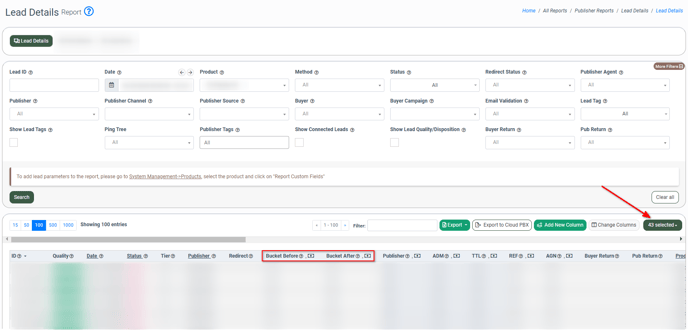](https://support.phonexa.com/hubfs/ksnip_20241223-115403.png?hsLang=en)
### An example of how Bucket Bank works
| **Step** | **Lead Status** | **Bucket Before** | **Bucket After** | **Publisher** | **ADM** |
| --- | --- | --- | --- | --- | --- |
| **1. First Lead** | Reject | 0 | 35 | 0 | 50 |
| **2. Second Lead** | Reject | 35 | 70 | 0 | 50 |
| **3. Third Lead** | Sold | 70 | 5 | 100 | 50 |
Use case:
- **First Lead**: The lead is rejected, and 70% of its value ($50) is added to the Bucket ($35).
- **Second Lead**: This lead is also rejected, and 70% of its value ($35) is added to the current Bucket value ($35), totaling $70.
- **Third Lead**: The lead is sold, the Publisher receives $100, and the remaining Bucket amount ($70 – $100 = $5) stays in the system.
- [General information](https://support.phonexa.com/general-information?hsLang=en#main-content)
- [Account Settings](https://support.phonexa.com/general-information?hsLang=en#account-settings)
- [Security Settings](https://support.phonexa.com/general-information?hsLang=en#security-settings)
- [Users](https://support.phonexa.com/general-information?hsLang=en#users)
- [System Customization](https://support.phonexa.com/general-information?hsLang=en#system-customization)
- [Project Customization](https://support.phonexa.com/general-information?hsLang=en#project-customization)
- [Product Customization](https://support.phonexa.com/general-information?hsLang=en#product-customization)
- [System Management](https://support.phonexa.com/general-information?hsLang=en#system-management)
- [Support](https://support.phonexa.com/general-information?hsLang=en#support)
- [LMS Sync & Call Logic](https://support.phonexa.com/lms-sync-call-logic?hsLang=en#main-content)
- [Extra Features](https://support.phonexa.com/lms-sync-call-logic?hsLang=en#extra-features)
- [Publisher Configuration](https://support.phonexa.com/lms-sync-call-logic?hsLang=en#publisher-configuration)
- [Client Management](https://support.phonexa.com/lms-sync-call-logic?hsLang=en#client-management)
- [System Logs](https://support.phonexa.com/lms-sync-call-logic?hsLang=en#system-logs)
- [Documents And References](https://support.phonexa.com/lms-sync-call-logic?hsLang=en#documents-and-references)
- [Reports and Analytics](https://support.phonexa.com/lms-sync-call-logic?hsLang=en#reports-and-analytics)
- [Publisher management](https://support.phonexa.com/lms-sync-call-logic?hsLang=en#publisher-management)
- [Call Logic Customization](https://support.phonexa.com/lms-sync-call-logic?hsLang=en#call-logic-customization)
- [Campaign Configuration](https://support.phonexa.com/lms-sync-call-logic?hsLang=en#campaign-configuration)
- [Feed CMS](https://support.phonexa.com/lms-sync-call-logic?hsLang=en#feed-cms)
- [Event Tracking](https://support.phonexa.com/lms-sync-call-logic?hsLang=en#event-tracking)
- [iClear](https://support.phonexa.com/lms-sync-call-logic?hsLang=en#iclear)
- [E-Delivery](https://support.phonexa.com/e-delivery?hsLang=en#main-content)
- [List Management](https://support.phonexa.com/e-delivery?hsLang=en#list-management)
- [Email Campaigns](https://support.phonexa.com/e-delivery?hsLang=en#email-campaigns)
- [SMS Campaigns](https://support.phonexa.com/e-delivery?hsLang=en#sms-campaigns)
- [Reports](https://support.phonexa.com/e-delivery?hsLang=en#reports)
- [Suppression Management](https://support.phonexa.com/e-delivery?hsLang=en#suppression-management)
- [Books360](https://support.phonexa.com/books360?hsLang=en#main-content)
- [Books 360 Integration](https://support.phonexa.com/books360?hsLang=en#books-360-integration)
- [Vendor Management](https://support.phonexa.com/books360?hsLang=en#vendor-management)
- [Account](https://support.phonexa.com/books360?hsLang=en#account)
- [Customer Management](https://support.phonexa.com/books360?hsLang=en#customer-management)
- [Opt-Intel](https://support.phonexa.com/opt-intel?hsLang=en#main-content)
- [List Management](https://support.phonexa.com/opt-intel?hsLang=en#list-management)
- [All Reports](https://support.phonexa.com/opt-intel?hsLang=en#all-reports)
- [Mailers](https://support.phonexa.com/opt-intel?hsLang=en#mailers)
- [Campaigns](https://support.phonexa.com/opt-intel?hsLang=en#campaigns)
- [System Management](https://support.phonexa.com/opt-intel?hsLang=en#system-management)
- [HitMetrix](https://support.phonexa.com/hitmetrix?hsLang=en#main-content)
- [Analytics](https://support.phonexa.com/hitmetrix?hsLang=en#analytics)
- [Heatmaps](https://support.phonexa.com/hitmetrix?hsLang=en#heatmaps)
- [System Management](https://support.phonexa.com/hitmetrix?hsLang=en#system-management)
- [Lynx](https://support.phonexa.com/lynx?hsLang=en#main-content)
- [Offers](https://support.phonexa.com/lynx?hsLang=en#offers)
- [LYNX Reports](https://support.phonexa.com/lynx?hsLang=en#lynx-reports)
- [Advertisers](https://support.phonexa.com/lynx?hsLang=en#advertisers)
- [Affiliates](https://support.phonexa.com/lynx?hsLang=en#affiliates)
- [Account Settings](https://support.phonexa.com/lynx?hsLang=en#account-settings)
- [Cloud PBX](https://support.phonexa.com/cloud-pbx?hsLang=en)
[](https://phonexa.com/?hsLang=en)
Phonexa Knowledge Base
Copyright © 2026, Phonexa