---
title: How To Create SMS Templates
description: Learn how to create SMS templates for your campaigns. Add new and manage old SMS templates with our quick guide.
---
[Skip to content](https://support.phonexa.com/how-to-create-sms-templates#main-content)
[](https://support.phonexa.com/?hsLang=en)
Open main navigation
Close main navigation
- [➜\]](https://phonexa.com/)
[➜\]](https://phonexa.com/?hsLang=en)
Phonexa Support Center
- There are no suggestions because the search field is empty.
1. [Knowledge Base](https://support.phonexa.com/?hsLang=en)
2. [E-Delivery](https://support.phonexa.com/e-delivery?hsLang=en)
3. [List Management](https://support.phonexa.com/e-delivery?hsLang=en#list-management)
# How To Create SMS Templates
## Learn how to create SMS templates for your campaigns. Add new and manage old SMS templates with our quick guide.
You can view the detailed instruction on how to create and manage SMS templates.
Please follow this guide to create and manage SMS templates. These need to be set up in order to create an SMS campaign.
**SMS Template**
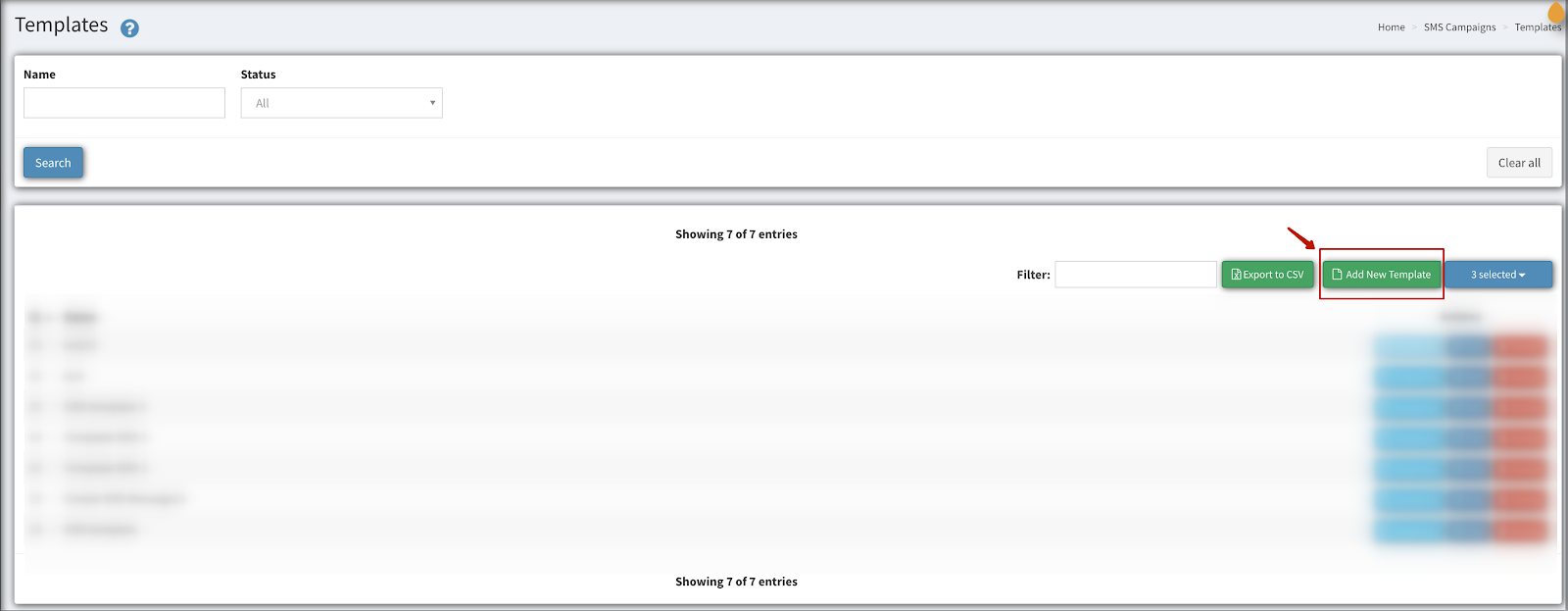
1. To create an SMS Template, go to **SMS Campaigns \> Templates** section. Click on “**Add New Template**’’
[](https://support.phonexa.com/hubfs/Knowledge%20Base%20Import/phonexa-4703e840ef03.intercom-attachments-7.comio152407490dcd9e3319b23595001abdc53grTj7KqnN8mJ8hBImVPH552tx2zqPXuZuUpm21DN4cPfjiVFnoyaCpZCZ4EMSG-1.png?hsLang=en)
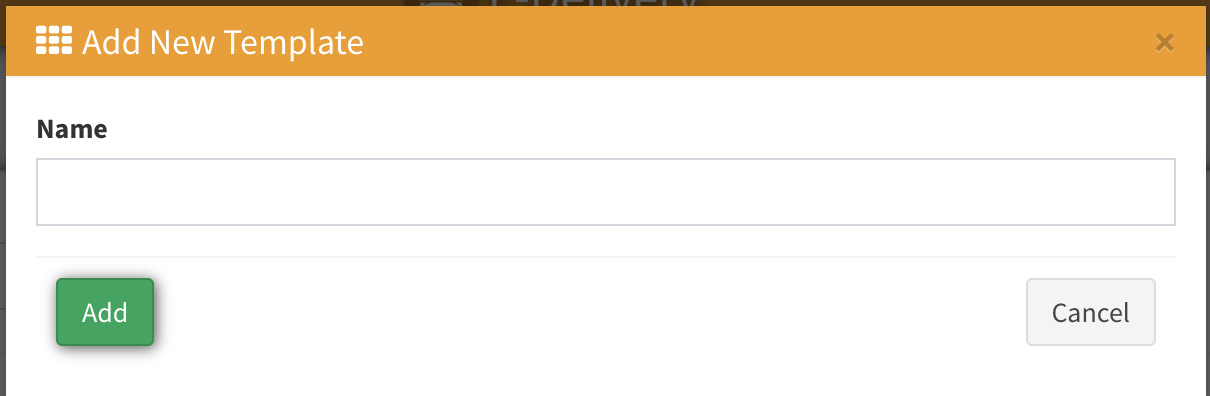
2\. From the popup, you can type the template name you would like. This name could be the name of the Template for easy access. For example, ‘*SMS Template 1*’ and click on ‘**Add**’.
[](https://support.phonexa.com/hubfs/Knowledge%20Base%20Import/phonexa-4703e840ef03.intercom-attachments-7.comio1524074932c4efe379d5920644793ff10Eh9XnppIowvIHbYIADtwxXHJb5K-gHNGvfx072oMbjioXqYQMFnBJVXZEOj2SL-1.png?hsLang=en)
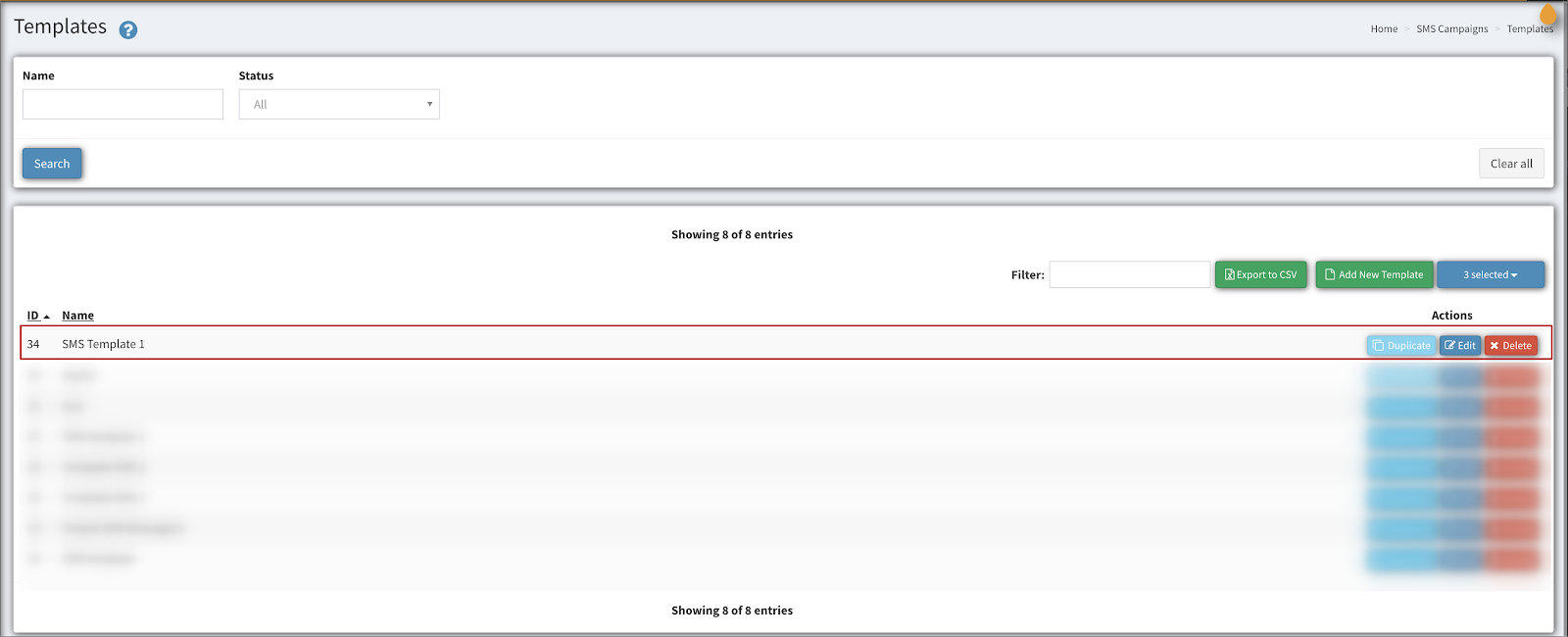
3\. From the template row, click on ‘**Edit**’ to access the template content.
[](https://support.phonexa.com/hubfs/Knowledge%20Base%20Import/phonexa-4703e840ef03.intercom-attachments-7.comio15240749573ea28304d8a52c69c57c45fG2wxCaJlJO2AsQWYv8lJQ-vjlkN4HWI3r4sG0ZJ8JAD1rHvJ8GiNPOIa_WNHTr-1.png?hsLang=en)
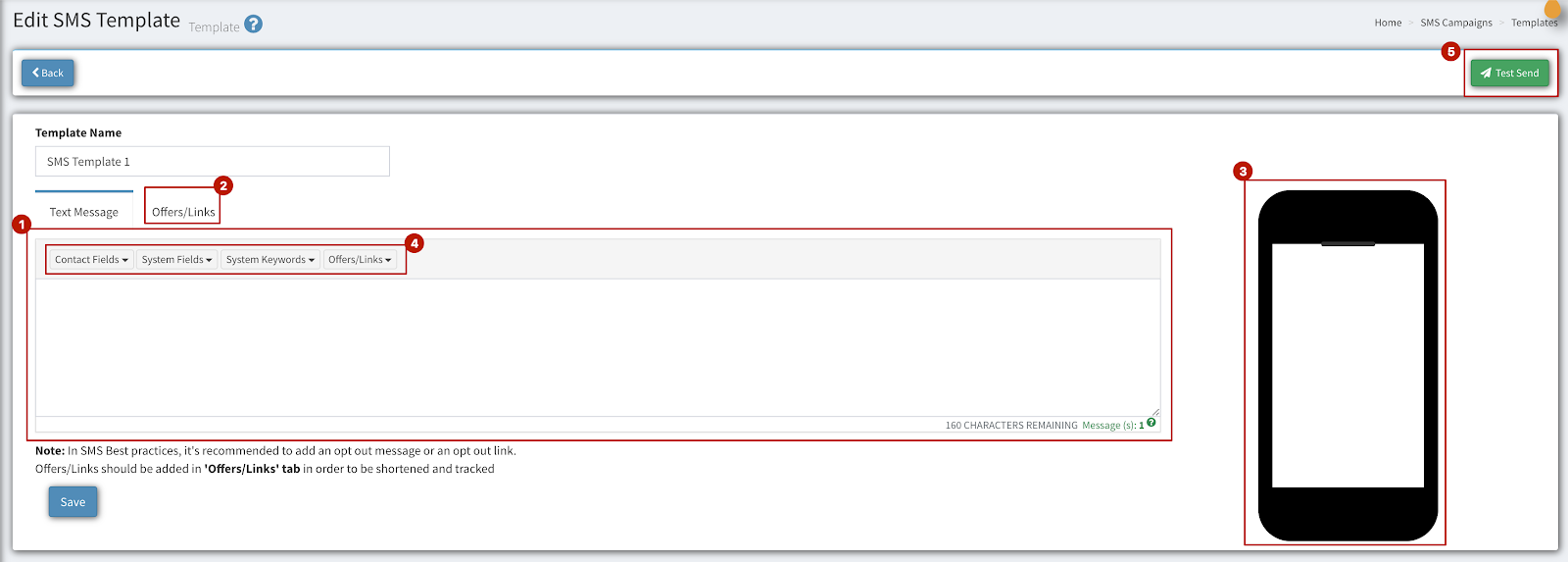
4\. Once you click on ‘**Edit**’ you will be taken to the ‘**Template Edit**’ page as shown below.
Below you can view a breakdown of each section on this page:
[](https://support.phonexa.com/hubfs/Knowledge%20Base%20Import/phonexa-4703e840ef03.intercom-attachments-7.comio1524074981b72fc250bbf9d6117baa062gIAtQ_446MbK_5jhsXZqIOyYZ9RAde6Ew6hgH8TeLOcw6m8t53KsI8GMfilNEo-1.png?hsLang=en)
(1). **Text Message**: In this section, you have the ability to type the SMS message you would like to send.
(2). **Offers/Links**: In this section, you have the ability to add offers or links (URLs). You can also inject custom fields and variables.
(3). **Preview**: Once you start typing your message, the preview will give you an idea of how your message will show in a mobile device.
(4). **Inject** **Fields**: You have different fields to inject to your template:
- **Contact** **Fields**: such as first name, last name, email, phone, and others.
- **System** **Fields**: such as year, contact date added, and others.
- **System** **Keywords**: Help, Stop, etc..
- **Offers/Links**: These are the offers and links you create from this tab (2). They will show as a short code. Also, you can add an unsubscribe link.
(5). **Test** **Send**: This option gives you the ability to test your template you just created to a test phone number.
Click on ‘**Save**’ to save your template.
- [General information](https://support.phonexa.com/general-information?hsLang=en#main-content)
- [Account Settings](https://support.phonexa.com/general-information?hsLang=en#account-settings)
- [Security Settings](https://support.phonexa.com/general-information?hsLang=en#security-settings)
- [Users](https://support.phonexa.com/general-information?hsLang=en#users)
- [System Customization](https://support.phonexa.com/general-information?hsLang=en#system-customization)
- [Project Customization](https://support.phonexa.com/general-information?hsLang=en#project-customization)
- [Product Customization](https://support.phonexa.com/general-information?hsLang=en#product-customization)
- [System Management](https://support.phonexa.com/general-information?hsLang=en#system-management)
- [Support](https://support.phonexa.com/general-information?hsLang=en#support)
- [LMS Sync & Call Logic](https://support.phonexa.com/lms-sync-call-logic?hsLang=en#main-content)
- [Extra Features](https://support.phonexa.com/lms-sync-call-logic?hsLang=en#extra-features)
- [Publisher Configuration](https://support.phonexa.com/lms-sync-call-logic?hsLang=en#publisher-configuration)
- [Client Management](https://support.phonexa.com/lms-sync-call-logic?hsLang=en#client-management)
- [System Logs](https://support.phonexa.com/lms-sync-call-logic?hsLang=en#system-logs)
- [Documents And References](https://support.phonexa.com/lms-sync-call-logic?hsLang=en#documents-and-references)
- [Reports and Analytics](https://support.phonexa.com/lms-sync-call-logic?hsLang=en#reports-and-analytics)
- [Publisher management](https://support.phonexa.com/lms-sync-call-logic?hsLang=en#publisher-management)
- [Call Logic Customization](https://support.phonexa.com/lms-sync-call-logic?hsLang=en#call-logic-customization)
- [Campaign Configuration](https://support.phonexa.com/lms-sync-call-logic?hsLang=en#campaign-configuration)
- [Feed CMS](https://support.phonexa.com/lms-sync-call-logic?hsLang=en#feed-cms)
- [Event Tracking](https://support.phonexa.com/lms-sync-call-logic?hsLang=en#event-tracking)
- [iClear](https://support.phonexa.com/lms-sync-call-logic?hsLang=en#iclear)
- [E-Delivery](https://support.phonexa.com/e-delivery?hsLang=en#main-content)
- [List Management](https://support.phonexa.com/e-delivery?hsLang=en#list-management)
- [Email Campaigns](https://support.phonexa.com/e-delivery?hsLang=en#email-campaigns)
- [SMS Campaigns](https://support.phonexa.com/e-delivery?hsLang=en#sms-campaigns)
- [Reports](https://support.phonexa.com/e-delivery?hsLang=en#reports)
- [Suppression Management](https://support.phonexa.com/e-delivery?hsLang=en#suppression-management)
- [Books360](https://support.phonexa.com/books360?hsLang=en#main-content)
- [Books 360 Integration](https://support.phonexa.com/books360?hsLang=en#books-360-integration)
- [Vendor Management](https://support.phonexa.com/books360?hsLang=en#vendor-management)
- [Account](https://support.phonexa.com/books360?hsLang=en#account)
- [Customer Management](https://support.phonexa.com/books360?hsLang=en#customer-management)
- [Opt-Intel](https://support.phonexa.com/opt-intel?hsLang=en#main-content)
- [List Management](https://support.phonexa.com/opt-intel?hsLang=en#list-management)
- [All Reports](https://support.phonexa.com/opt-intel?hsLang=en#all-reports)
- [Mailers](https://support.phonexa.com/opt-intel?hsLang=en#mailers)
- [Campaigns](https://support.phonexa.com/opt-intel?hsLang=en#campaigns)
- [System Management](https://support.phonexa.com/opt-intel?hsLang=en#system-management)
- [HitMetrix](https://support.phonexa.com/hitmetrix?hsLang=en#main-content)
- [Analytics](https://support.phonexa.com/hitmetrix?hsLang=en#analytics)
- [Heatmaps](https://support.phonexa.com/hitmetrix?hsLang=en#heatmaps)
- [System Management](https://support.phonexa.com/hitmetrix?hsLang=en#system-management)
- [Lynx](https://support.phonexa.com/lynx?hsLang=en#main-content)
- [Offers](https://support.phonexa.com/lynx?hsLang=en#offers)
- [LYNX Reports](https://support.phonexa.com/lynx?hsLang=en#lynx-reports)
- [Advertisers](https://support.phonexa.com/lynx?hsLang=en#advertisers)
- [Affiliates](https://support.phonexa.com/lynx?hsLang=en#affiliates)
- [Account Settings](https://support.phonexa.com/lynx?hsLang=en#account-settings)
- [Cloud PBX](https://support.phonexa.com/cloud-pbx?hsLang=en)
[](https://phonexa.com/?hsLang=en)
Phonexa Knowledge Base
Copyright © 2026, Phonexa