---
title: "iClear: Litigant Alert (Client Credentials)"
description: The Litigant Alert (Client Credentials) third-party service allows you to search and analyze the phone number for legal cases and identify the customers who pose a significant risk to your financial well-being, so that you can protect yourself.
---
[Skip to content](https://support.phonexa.com/iclear-litigant-alert-client-credentials#main-content)
[](https://support.phonexa.com/?hsLang=en)
Open main navigation
Close main navigation
- [➜\]](https://phonexa.com/)
[➜\]](https://phonexa.com/?hsLang=en)
Phonexa Support Center
- There are no suggestions because the search field is empty.
1. [Knowledge Base](https://support.phonexa.com/?hsLang=en)
2. [LMS Sync & Call Logic](https://support.phonexa.com/lms-sync-call-logic?hsLang=en)
3. [iClear](https://support.phonexa.com/lms-sync-call-logic?hsLang=en#iclear)
# iClear: Litigant Alert (Client Credentials)
## The Litigant Alert (Client Credentials) third-party service allows you to search and analyze the phone number for legal cases and identify the customers who pose a significant risk to your financial well-being, so that you can protect yourself. Use your Litigant Alert service client credentials to integrate with Phonexa and activate the service.
To enable this service, go to the **Fraud and Anomaly \> iClear \> Lead Processing Rules** section and select a Product from the drop-down list. Click the **“Select”** button to proceed.
[](https://support.phonexa.com/hubfs/undefined-Jan-09-2026-11-06-01-9916-AM.png?hsLang=en)
Once you select the Product, you’ll be automatically redirected to the **“Lead Processing Rules (iClear)”** subtab. You may also navigate here by selecting the **System Management \> Products** section on the left-hand menu and clicking on the **“Settings”** button for the corresponding product (**Lead Processing Rules (iClear)** sub-tab).
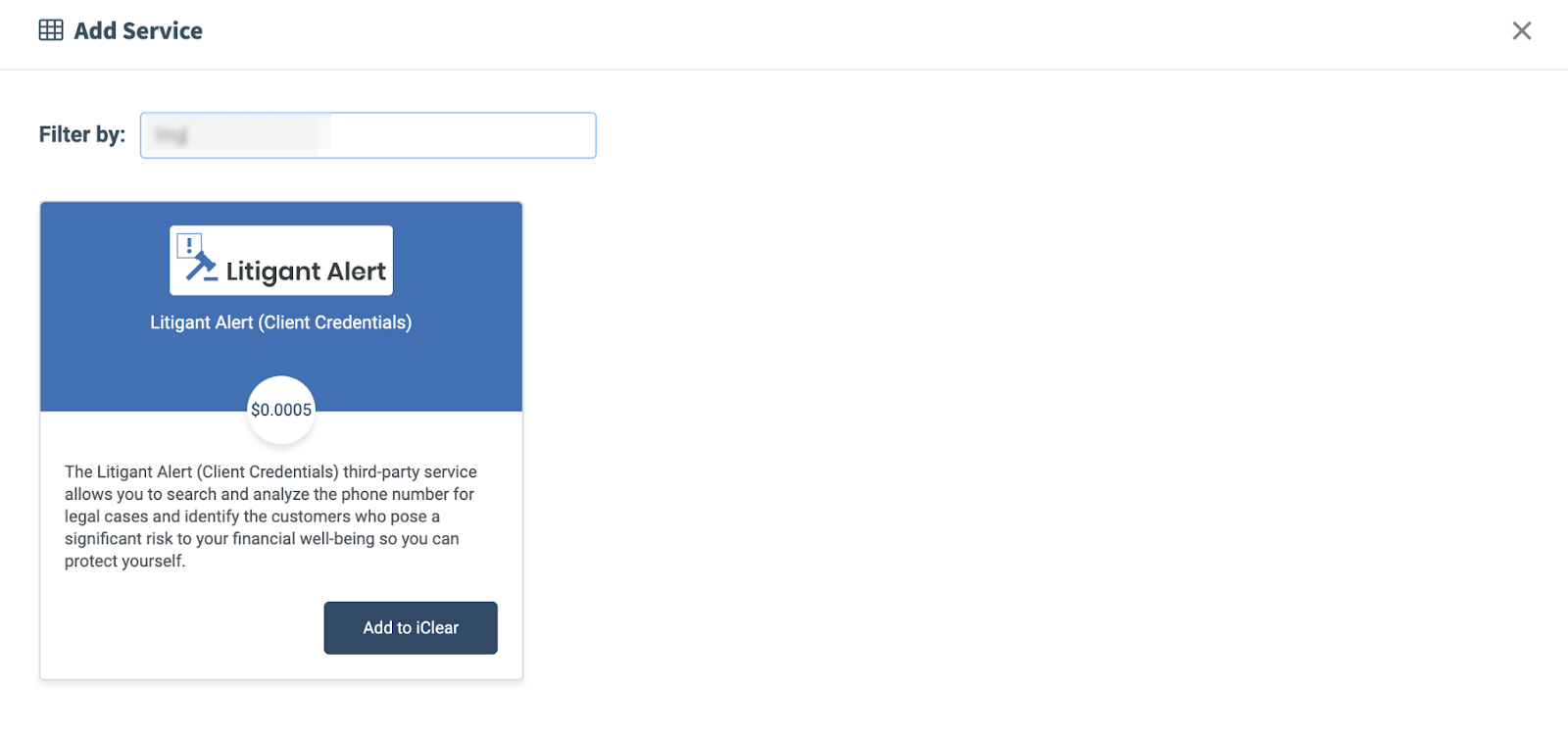
To configure this service, click the **“Add Service”** button in the **Global Rules** block. Navigate to the **“Litigant Alert (Client Credentials)”** block and click the **“Add to iClear”** button.
[](https://support.phonexa.com/hubfs/undefined-Jan-09-2026-11-06-02-3004-AM.png?hsLang=en)
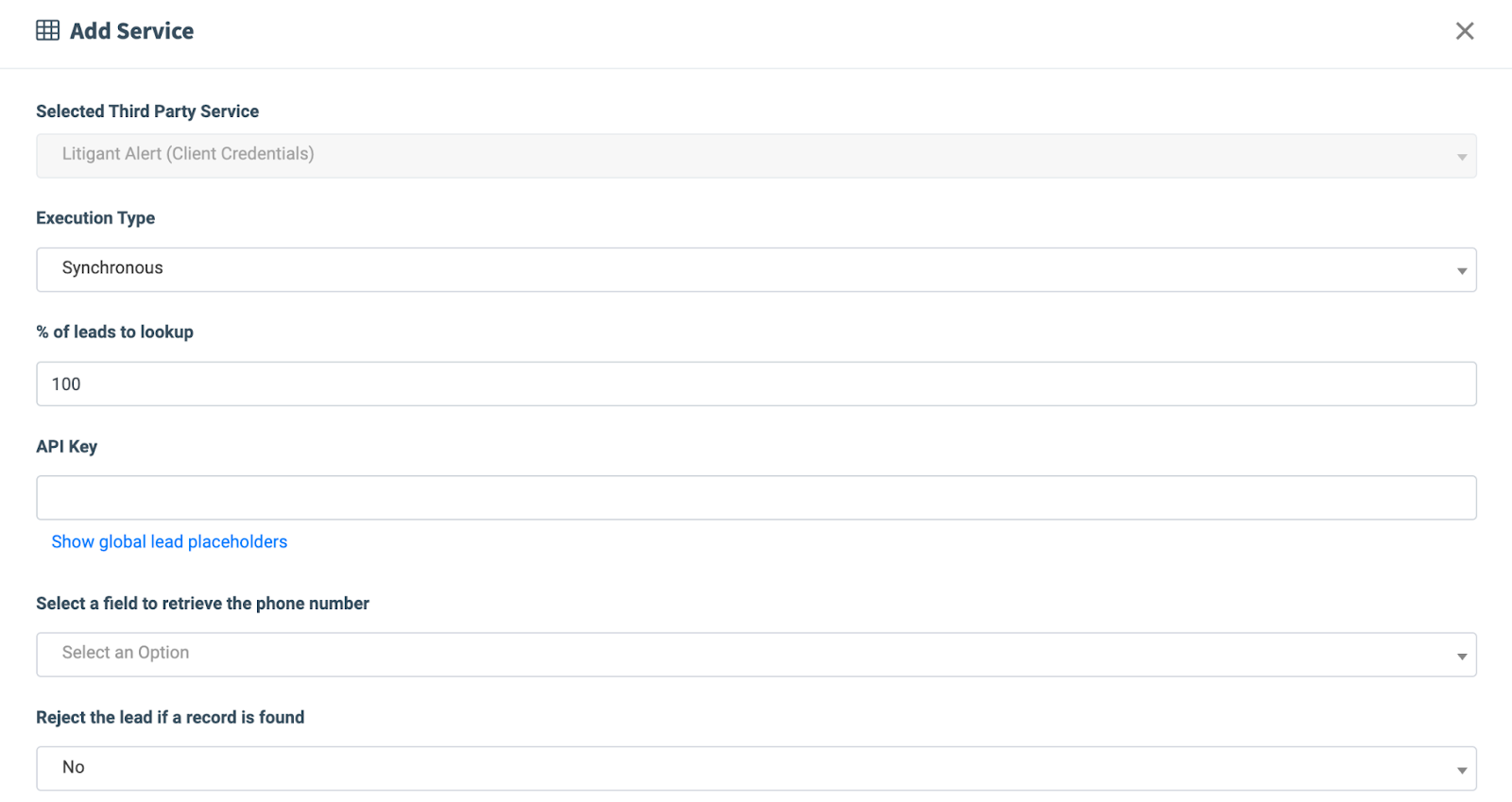
Fill in the following fields:
- **Execution Type:**
- Select the **"Asynchronous"** option to make a simultaneous request and process a lead without waiting for the lookup outcome. This execution type is recommended for analytical purposes, rather than for real-time filtration of a lead based on the lookup status. While processing a lead, the system will make a Litigant Alert (service) request. The response to the request will be obtained and saved in the system, which can be viewed in the Lead Details section.
- Select the **"Synchronous"** option to wait for the service lookup outcome before processing a lead. This execution type is recommended for real-time filtration of a lead based on the lookup status. Before processing a lead, the system will make a Litigant Alert (service) request. While synchronous processing, we can make an impact on the lead processing and reject it if needed.
- Select the “**On-Demand**” option to enable lead filtration when the **“% of lead to lookup”** is set as 0 (null).
- **% of leads lookup:** Set the percentage of leads to be checked through this service.
- **API Key:** Enter the Litigant Alert service API credentials.
- **Select a field to retrieve the phone number:** Select which field the system will retrieve the lead phone number from (e.g., home phone, cell phone, work phone, etc).
- **Reject the lead if a record is found:** Select the **“Yes”** option to filter out the leads if any legal cases are found.
[](https://support.phonexa.com/hubfs/undefined-Jan-09-2026-11-06-03-1530-AM.png?hsLang=en)
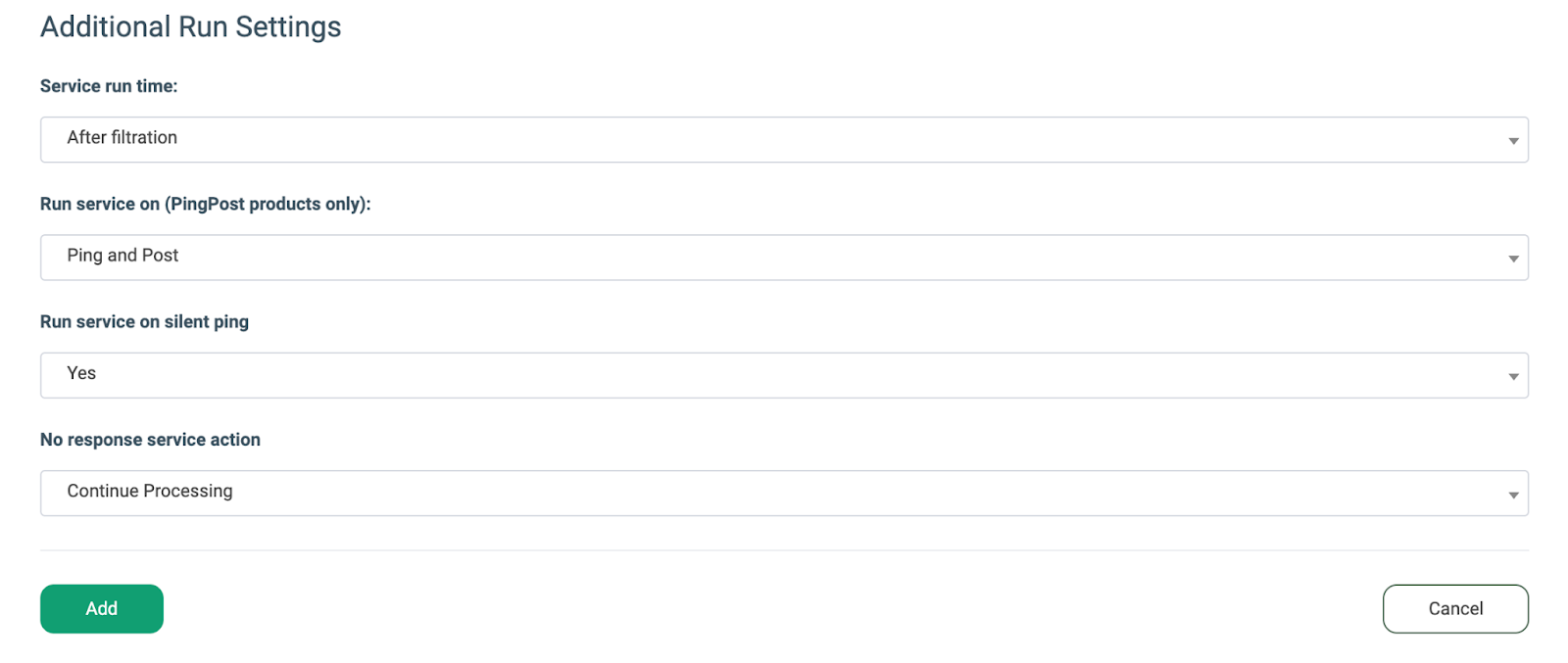
The **“Additional Run Settings”** configuration block allows you to configure more options to determine at which stage you would prefer to run the service.
- **Service run time:** Select whether you would prefer to run the service before or after the leads are filtered out (*After filtration / Before filtration*).
*Note: Please be aware that selecting this option may impact your invoice. Once this option is selected and no campaigns remain for the service to run, there will be no charges incurred.*
- **Run service on (PingPost products only):** Select one of the options to determine at which stage you would prefer to run the service for the Ping Post products (*Ping / Post / Ping and Post*).
- **Run service on silent ping:** Select **“Yes”** if you would like to run the service during the silent ping stage. Select **“No”** to exclude this option.
- **No response service action:** *(The system runs a lookup service. In case the service did not get any response, you can select the preferred action.)*
- Select the **“Continue Processing”** option if you want to continue processing leads when the service does not respond.
- Select the **“Reject the Lead”** option if you want to reject the lead when the service does not respond.
Click the “**Add**” button to confirm.
[](https://support.phonexa.com/hubfs/undefined-Jan-09-2026-11-06-02-6901-AM.png?hsLang=en)
*Read more about the Global Rules and Advanced Rules configuration in this Knowledge Base*[*article*](https://support.phonexa.com/fraud-and-anomaly-iclear?hsLang=en)*.*
- [General information](https://support.phonexa.com/general-information?hsLang=en#main-content)
- [Account Settings](https://support.phonexa.com/general-information?hsLang=en#account-settings)
- [Security Settings](https://support.phonexa.com/general-information?hsLang=en#security-settings)
- [Users](https://support.phonexa.com/general-information?hsLang=en#users)
- [System Customization](https://support.phonexa.com/general-information?hsLang=en#system-customization)
- [Project Customization](https://support.phonexa.com/general-information?hsLang=en#project-customization)
- [Product Customization](https://support.phonexa.com/general-information?hsLang=en#product-customization)
- [System Management](https://support.phonexa.com/general-information?hsLang=en#system-management)
- [Support](https://support.phonexa.com/general-information?hsLang=en#support)
- [LMS Sync & Call Logic](https://support.phonexa.com/lms-sync-call-logic?hsLang=en#main-content)
- [Extra Features](https://support.phonexa.com/lms-sync-call-logic?hsLang=en#extra-features)
- [Publisher Configuration](https://support.phonexa.com/lms-sync-call-logic?hsLang=en#publisher-configuration)
- [Client Management](https://support.phonexa.com/lms-sync-call-logic?hsLang=en#client-management)
- [System Logs](https://support.phonexa.com/lms-sync-call-logic?hsLang=en#system-logs)
- [Documents And References](https://support.phonexa.com/lms-sync-call-logic?hsLang=en#documents-and-references)
- [Reports and Analytics](https://support.phonexa.com/lms-sync-call-logic?hsLang=en#reports-and-analytics)
- [Publisher management](https://support.phonexa.com/lms-sync-call-logic?hsLang=en#publisher-management)
- [Call Logic Customization](https://support.phonexa.com/lms-sync-call-logic?hsLang=en#call-logic-customization)
- [Campaign Configuration](https://support.phonexa.com/lms-sync-call-logic?hsLang=en#campaign-configuration)
- [Feed CMS](https://support.phonexa.com/lms-sync-call-logic?hsLang=en#feed-cms)
- [Event Tracking](https://support.phonexa.com/lms-sync-call-logic?hsLang=en#event-tracking)
- [iClear](https://support.phonexa.com/lms-sync-call-logic?hsLang=en#iclear)
- [E-Delivery](https://support.phonexa.com/e-delivery?hsLang=en#main-content)
- [List Management](https://support.phonexa.com/e-delivery?hsLang=en#list-management)
- [Email Campaigns](https://support.phonexa.com/e-delivery?hsLang=en#email-campaigns)
- [SMS Campaigns](https://support.phonexa.com/e-delivery?hsLang=en#sms-campaigns)
- [Reports](https://support.phonexa.com/e-delivery?hsLang=en#reports)
- [Suppression Management](https://support.phonexa.com/e-delivery?hsLang=en#suppression-management)
- [Books360](https://support.phonexa.com/books360?hsLang=en#main-content)
- [Books 360 Integration](https://support.phonexa.com/books360?hsLang=en#books-360-integration)
- [Vendor Management](https://support.phonexa.com/books360?hsLang=en#vendor-management)
- [Account](https://support.phonexa.com/books360?hsLang=en#account)
- [Customer Management](https://support.phonexa.com/books360?hsLang=en#customer-management)
- [Opt-Intel](https://support.phonexa.com/opt-intel?hsLang=en#main-content)
- [List Management](https://support.phonexa.com/opt-intel?hsLang=en#list-management)
- [All Reports](https://support.phonexa.com/opt-intel?hsLang=en#all-reports)
- [Mailers](https://support.phonexa.com/opt-intel?hsLang=en#mailers)
- [Campaigns](https://support.phonexa.com/opt-intel?hsLang=en#campaigns)
- [System Management](https://support.phonexa.com/opt-intel?hsLang=en#system-management)
- [HitMetrix](https://support.phonexa.com/hitmetrix?hsLang=en#main-content)
- [Analytics](https://support.phonexa.com/hitmetrix?hsLang=en#analytics)
- [Heatmaps](https://support.phonexa.com/hitmetrix?hsLang=en#heatmaps)
- [System Management](https://support.phonexa.com/hitmetrix?hsLang=en#system-management)
- [Lynx](https://support.phonexa.com/lynx?hsLang=en#main-content)
- [Offers](https://support.phonexa.com/lynx?hsLang=en#offers)
- [LYNX Reports](https://support.phonexa.com/lynx?hsLang=en#lynx-reports)
- [Advertisers](https://support.phonexa.com/lynx?hsLang=en#advertisers)
- [Affiliates](https://support.phonexa.com/lynx?hsLang=en#affiliates)
- [Account Settings](https://support.phonexa.com/lynx?hsLang=en#account-settings)
- [Cloud PBX](https://support.phonexa.com/cloud-pbx?hsLang=en)
[](https://phonexa.com/?hsLang=en)
Phonexa Knowledge Base
Copyright © 2026, Phonexa