---
title: "iClear: Simple IDV"
description: "The iClear: Simple IDV service allows you to validate an individual’s name(s)/alias(es), address(es), phone number(s), SSN, date of birth, deceased indicator, and bankruptcy records using a provided phone number through a third-party database."
---
[Skip to content](https://support.phonexa.com/iclear-simple-idv#main-content)
[](https://support.phonexa.com/?hsLang=en)
Open main navigation
Close main navigation
- [➜\]](https://phonexa.com/)
[➜\]](https://phonexa.com/?hsLang=en)
Phonexa Support Center
- There are no suggestions because the search field is empty.
1. [Knowledge Base](https://support.phonexa.com/?hsLang=en)
2. [LMS Sync & Call Logic](https://support.phonexa.com/lms-sync-call-logic?hsLang=en)
3. [iClear](https://support.phonexa.com/lms-sync-call-logic?hsLang=en#iclear)
# iClear: Simple IDV
## The iClear: Simple IDV service allows you to validate an individual’s name(s)/alias(es), address(es), phone number(s), SSN, date of birth, deceased indicator, and bankruptcy records using a provided phone number through a third-party database.
To enable this service, go to the **Fraud and Anomaly \> iClear \> Lead Processing Rules** section and select a Product from the drop-down list. Click the **“Select”** button to proceed.
[](https://support.phonexa.com/hubfs/iclear%20selection-1.png?hsLang=en)Once you select the Product, you’ll be automatically redirected to the **“Lead Processing Rules (iClear)”** subtab. You may also navigate here by selecting the **System Management \> Products** section on the left-hand menu and clicking on the **“Settings”** button for the corresponding product (**Lead Processing Rules (iClear)** sub-tab).
To configure this service, click the **“Add Service”** button in the **Global Rules** block. Fill in the following fields:
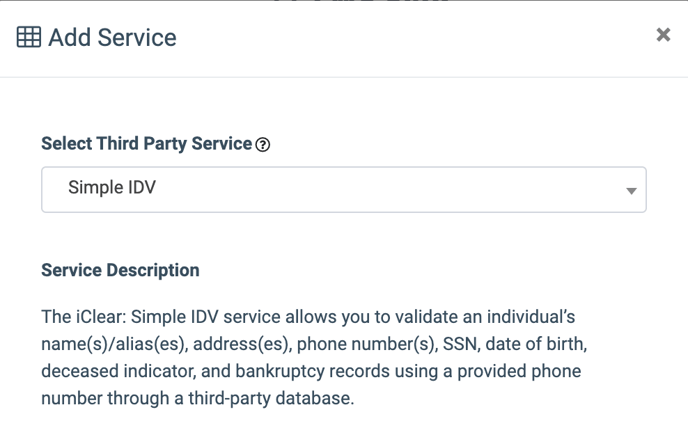
- **Select Third Party Service:** Select the **“Simple IDV”** option.
[](https://support.phonexa.com/hubfs/siple%20idv.png?hsLang=en)
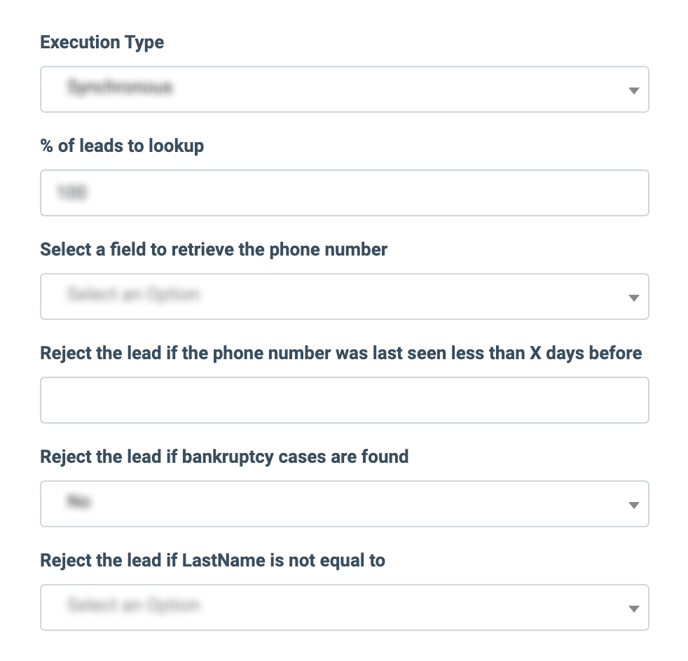
- **Execution Type:**
- Select the **"Synchronous"** option to wait for the service lookup outcome before processing a lead. This execution type is recommended for real-time filtration of a lead based on the lookup status. Before processing a lead, the system makes a request to the third-party database.
- Select the **"Asynchronous"** option to make a simultaneous request and process a lead without waiting for the lookup outcome. This execution type is recommended for analytical purposes and not for real-time lead filtration based on the lookup status. While processing a lead, the system makes a request to the third-party database.
- Select the **“On-Demand”** option to enable leads filtration when the **“% of lead to lookup”** is set as 0 (null).
- **% of leads to lookup:** Set the percentage of leads to be checked through this service.
- **Select a field to retrieve the phone number:** Select which field the system will retrieve the phone number from. *Example: cellPhone.*
- **Reject the lead if the phone number was last seen less than X days before:** Enter the time range (in days) within which the lead will be rejected after the multiple appearances in the system.
- **Reject the lead if any bankruptcy cases are found:** Select whether you want to reject the lead if any bankruptcy case is found.
- **Reject the lead if LastName is not equal to:** Select the field that the lead\`s Last Name should be equal to. The lead will be rejected if the value is not equal.
[](https://support.phonexa.com/hubfs/s%20IDV%202.png?hsLang=en)
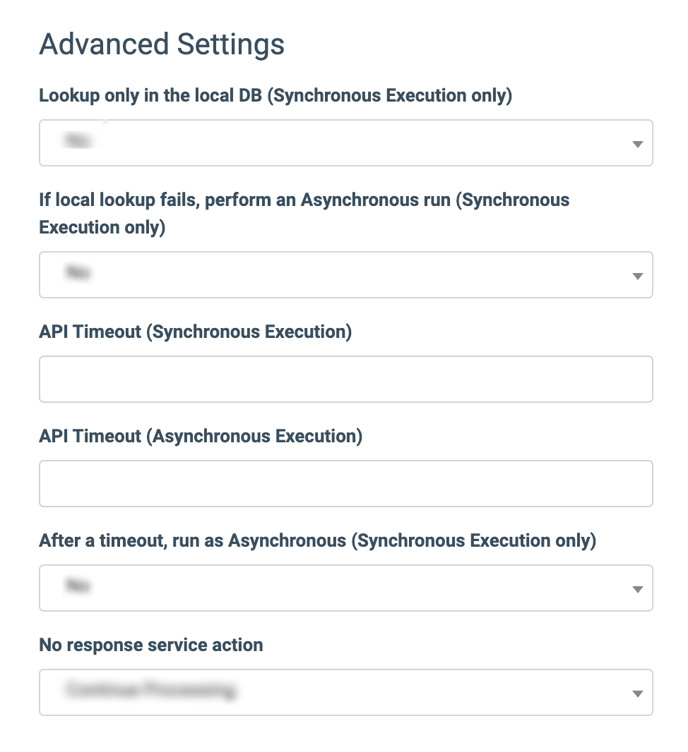
The **“Advanced Settings”** configuration block allows you to customize the lookup and timeout settings of the service according to the selected Execution Type.
- **Lookup only in the local DB (Synchronous Execution only):** Select **“Yes”** for the service to look up only in the local database. Select **“No”** for the service to look up both in the local database and API.
- **If local lookup fails, perform an Asynchronous run (Synchronous Execution only):** Select **“Yes”** to perform the Asynchronous run in case the local database lookup is unsuccessful. Select **“No”** to disable the lookup override.
- **API Timeout (Synchronous Execution):** Fill in the service response timeout *(from one to five seconds)*. *Note: The field is active only if the* ***“Lookup only in local DB”*** *option is disabled.*
- **API Timeout (Asynchronous Execution):** Fill in the service response timeout *(from one to five seconds)*.
- **After a timeout, run as Asynchronous (Synchronous Execution only):** Select **“Yes”** to perform the Asynchronous execution if the timeout runs out. Select **“No”** to disable the Asynchronous run override.
- **No response service action:** Select the action in case there is no response from the third party service *(Continue Processing, Reject Lead)*.
[](https://support.phonexa.com/hubfs/s%20IDV%203.png?hsLang=en)
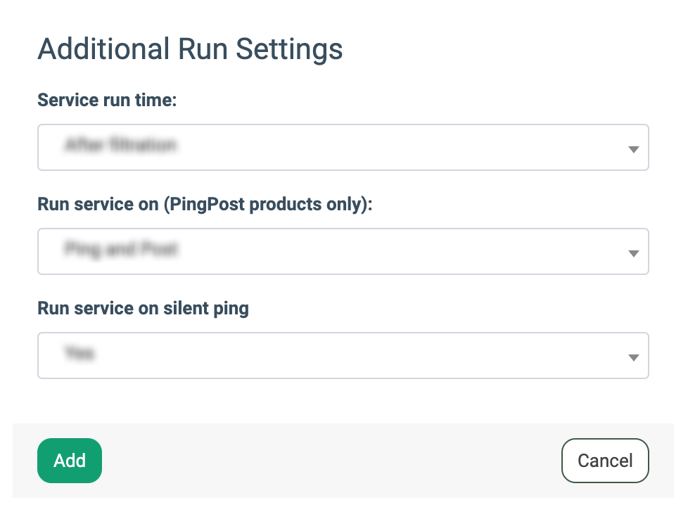
The **“Additional Run Settings”** configuration block allows you to configure more options to determine at which stage you would prefer to run the service.
- **Service run time:** Select whether you would prefer to run the service before or after the leads are filtered out (*After filtration / Before filtration*). *Note: Please be aware that selecting this option may impact your invoice. Once this option is selected and no campaigns remain for the service to run, no charges will be incurred.*
- **Run service on (PingPost products only):** Select one of the options to determine at which stage you prefer to run the service for the Ping Post products (*Ping / Post / Ping and Post*).
- **Run service on silent ping:** Select whether you want to run the service during the silent ping stage.
Click the **“Add”** button to confirm.
[](https://support.phonexa.com/hubfs/s%20IDV%204.png?hsLang=en)*Read more about the Global Rules and Advanced Rules configuration in this Knowledge Base* [*article*](https://support.phonexa.com/fraud-detector-iclear?hsLang=en)*.*
- [General information](https://support.phonexa.com/general-information?hsLang=en#main-content)
- [Account Settings](https://support.phonexa.com/general-information?hsLang=en#account-settings)
- [Security Settings](https://support.phonexa.com/general-information?hsLang=en#security-settings)
- [Users](https://support.phonexa.com/general-information?hsLang=en#users)
- [System Customization](https://support.phonexa.com/general-information?hsLang=en#system-customization)
- [Project Customization](https://support.phonexa.com/general-information?hsLang=en#project-customization)
- [Product Customization](https://support.phonexa.com/general-information?hsLang=en#product-customization)
- [System Management](https://support.phonexa.com/general-information?hsLang=en#system-management)
- [Support](https://support.phonexa.com/general-information?hsLang=en#support)
- [LMS Sync & Call Logic](https://support.phonexa.com/lms-sync-call-logic?hsLang=en#main-content)
- [Extra Features](https://support.phonexa.com/lms-sync-call-logic?hsLang=en#extra-features)
- [Publisher Configuration](https://support.phonexa.com/lms-sync-call-logic?hsLang=en#publisher-configuration)
- [Client Management](https://support.phonexa.com/lms-sync-call-logic?hsLang=en#client-management)
- [System Logs](https://support.phonexa.com/lms-sync-call-logic?hsLang=en#system-logs)
- [Documents And References](https://support.phonexa.com/lms-sync-call-logic?hsLang=en#documents-and-references)
- [Reports and Analytics](https://support.phonexa.com/lms-sync-call-logic?hsLang=en#reports-and-analytics)
- [Publisher management](https://support.phonexa.com/lms-sync-call-logic?hsLang=en#publisher-management)
- [Call Logic Customization](https://support.phonexa.com/lms-sync-call-logic?hsLang=en#call-logic-customization)
- [Campaign Configuration](https://support.phonexa.com/lms-sync-call-logic?hsLang=en#campaign-configuration)
- [Feed CMS](https://support.phonexa.com/lms-sync-call-logic?hsLang=en#feed-cms)
- [Event Tracking](https://support.phonexa.com/lms-sync-call-logic?hsLang=en#event-tracking)
- [iClear](https://support.phonexa.com/lms-sync-call-logic?hsLang=en#iclear)
- [E-Delivery](https://support.phonexa.com/e-delivery?hsLang=en#main-content)
- [List Management](https://support.phonexa.com/e-delivery?hsLang=en#list-management)
- [Email Campaigns](https://support.phonexa.com/e-delivery?hsLang=en#email-campaigns)
- [SMS Campaigns](https://support.phonexa.com/e-delivery?hsLang=en#sms-campaigns)
- [Reports](https://support.phonexa.com/e-delivery?hsLang=en#reports)
- [Suppression Management](https://support.phonexa.com/e-delivery?hsLang=en#suppression-management)
- [Books360](https://support.phonexa.com/books360?hsLang=en#main-content)
- [Books 360 Integration](https://support.phonexa.com/books360?hsLang=en#books-360-integration)
- [Vendor Management](https://support.phonexa.com/books360?hsLang=en#vendor-management)
- [Account](https://support.phonexa.com/books360?hsLang=en#account)
- [Customer Management](https://support.phonexa.com/books360?hsLang=en#customer-management)
- [Opt-Intel](https://support.phonexa.com/opt-intel?hsLang=en#main-content)
- [List Management](https://support.phonexa.com/opt-intel?hsLang=en#list-management)
- [All Reports](https://support.phonexa.com/opt-intel?hsLang=en#all-reports)
- [Mailers](https://support.phonexa.com/opt-intel?hsLang=en#mailers)
- [Campaigns](https://support.phonexa.com/opt-intel?hsLang=en#campaigns)
- [System Management](https://support.phonexa.com/opt-intel?hsLang=en#system-management)
- [HitMetrix](https://support.phonexa.com/hitmetrix?hsLang=en#main-content)
- [Analytics](https://support.phonexa.com/hitmetrix?hsLang=en#analytics)
- [Heatmaps](https://support.phonexa.com/hitmetrix?hsLang=en#heatmaps)
- [System Management](https://support.phonexa.com/hitmetrix?hsLang=en#system-management)
- [Lynx](https://support.phonexa.com/lynx?hsLang=en#main-content)
- [Offers](https://support.phonexa.com/lynx?hsLang=en#offers)
- [LYNX Reports](https://support.phonexa.com/lynx?hsLang=en#lynx-reports)
- [Advertisers](https://support.phonexa.com/lynx?hsLang=en#advertisers)
- [Affiliates](https://support.phonexa.com/lynx?hsLang=en#affiliates)
- [Account Settings](https://support.phonexa.com/lynx?hsLang=en#account-settings)
- [Cloud PBX](https://support.phonexa.com/cloud-pbx?hsLang=en)
[](https://phonexa.com/?hsLang=en)
Phonexa Knowledge Base
Copyright © 2026, Phonexa