---
title: "SMS Campaigns: Shortener Domain"
description: Make URLs shorter with ease using Shortener Domain feature. Add short URLs for instances and use them in your SMS campaigns.
---
[Skip to content](https://support.phonexa.com/sms-campaigns-shortener-domain#main-content)
[](https://support.phonexa.com/?hsLang=en)
Open main navigation
Close main navigation
- [➜\]](https://phonexa.com/)
[➜\]](https://phonexa.com/?hsLang=en)
Phonexa Support Center
- There are no suggestions because the search field is empty.
1. [Knowledge Base](https://support.phonexa.com/?hsLang=en)
2. [E-Delivery](https://support.phonexa.com/e-delivery?hsLang=en)
3. [SMS Campaigns](https://support.phonexa.com/e-delivery?hsLang=en#sms-campaigns)
# SMS Campaigns: Shortener Domain
## Make URLs shorter with ease using Shortener Domain feature. Add short URLs for instances and use them in your SMS campaigns.
The **“Shortener Domain”** option allows you to shorten the URL to add your short domains for your instance and use them in rotation for your SMS campaigns.
To set up the option go to the **SMS Campaigns \> Settings \> Links Management** section.
[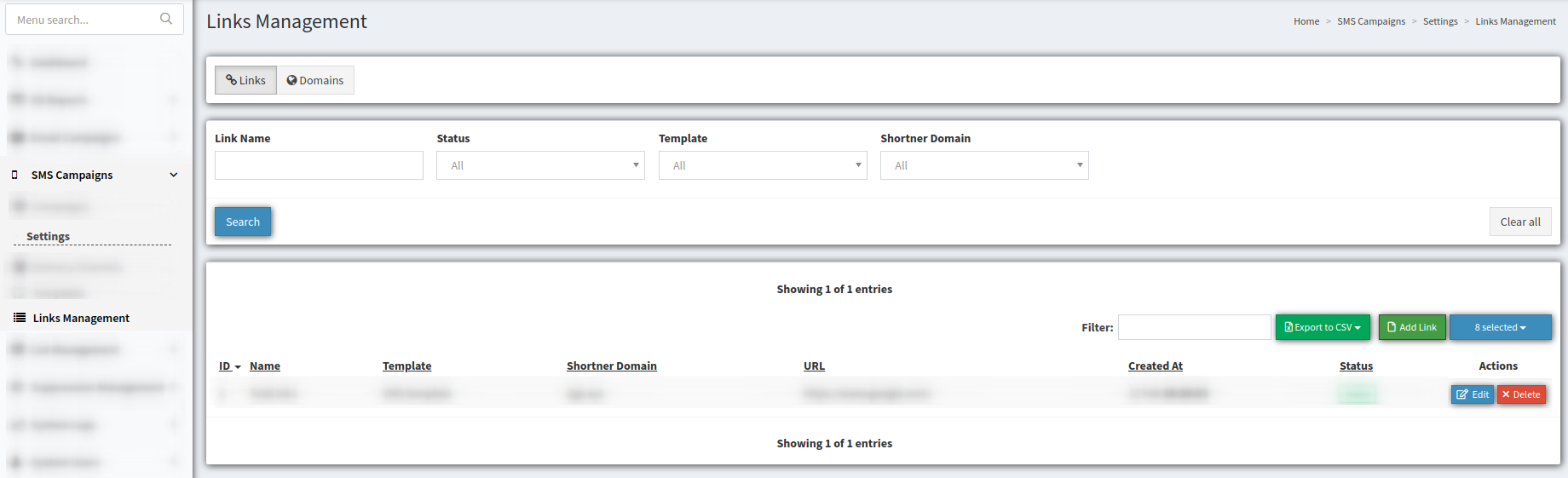](https://phonexa-4703e840ef03.intercom-attachments-1.com/i/o/339504069/ad8004e5dfb40b067de6d1ca/shortner-20links-20tab.png)
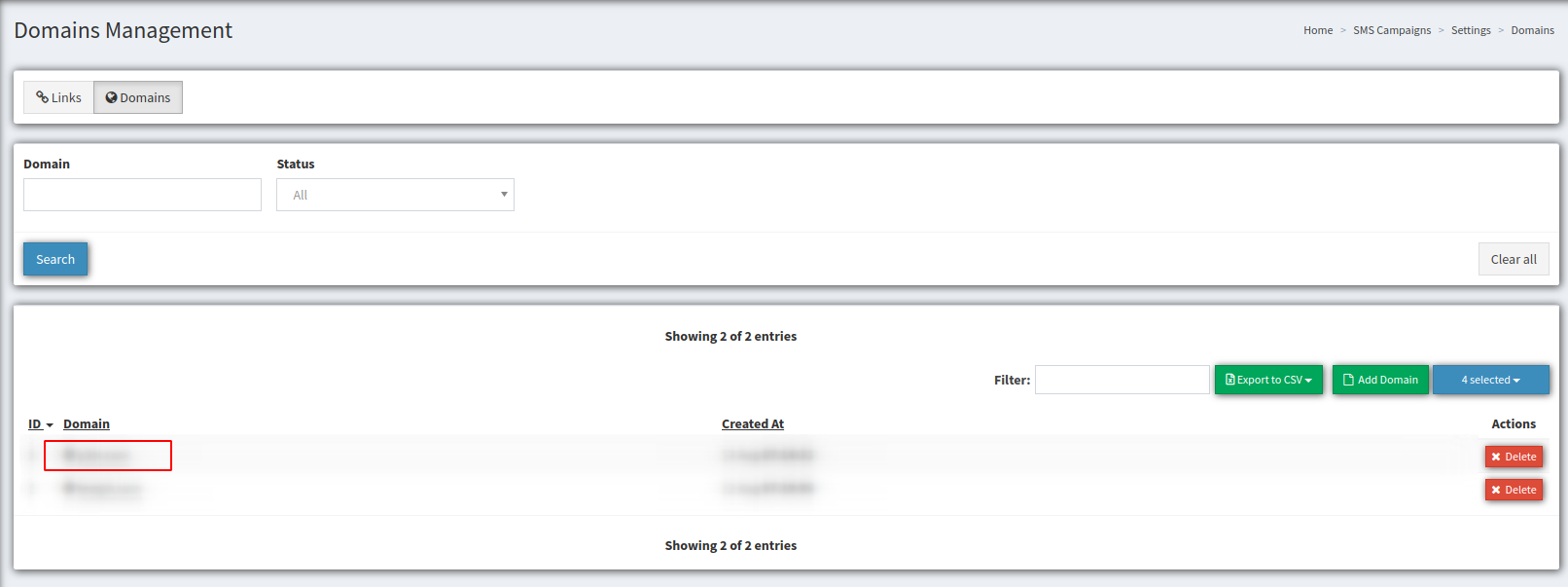
To generate a list of the existing domains, use the next filter fields :
- **Domain** - enter the domain’s name
- **Status** - choose the domain status from the drop-down list *(Active, Inactive)*
[](https://phonexa-4703e840ef03.intercom-attachments-1.com/i/o/339504075/71ceedb6a7934cf4be9756f6/shortner-20domains-20tab.png)The **domains** list displays the following data:
- **ID** - the domain ID number.
- **Domain** - the added shortened domain. By clicking the domain, you may check the status of the domain (a green circle means the domain is active and ready to use).
- **Created** **At** - the domain creation date and time.
- **Actions** - contains the **“X Delete”** button to remove the domain.
To add a new third-party domain, click the **“Add Domain”** button. In the pop-up window, fill in the domain name in the **“Domain”** field and click the **“Add”** button to proceed.
[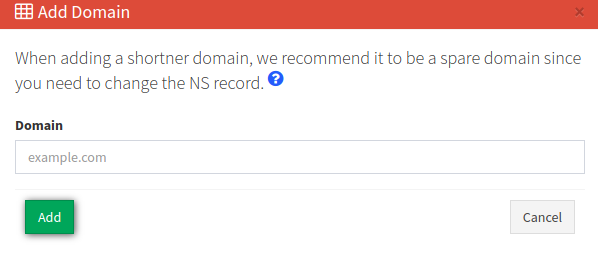](https://phonexa-4703e840ef03.intercom-attachments-1.com/i/o/330554570/49e34b85203c85df3a4ee4a9/add-20domain.png)
The system will display the success message and a text with instructions on how to configure the domain DNS Nameserver. To make the domain active, copy the NS records and add them to your domain registrar. The propagation of this change could take up to 24 hrs.
[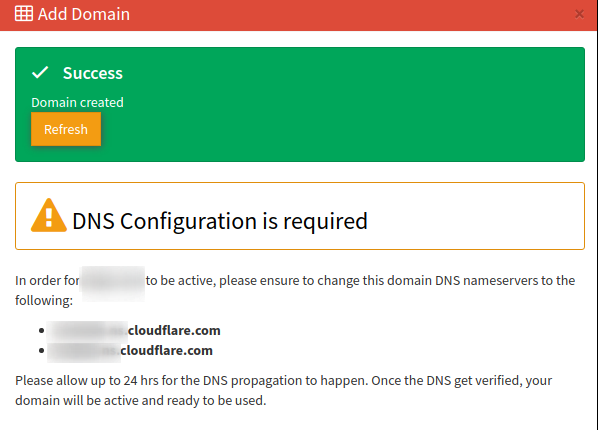](https://phonexa-4703e840ef03.intercom-attachments-1.com/i/o/330554571/6da242c301f06e7e3733ad98/add-20domain-20step-202.png)
To update the domain status, select the domain record from the list and click the domain link.
Click the **“Re-Check NS”** button in the pop-up window.
[](https://phonexa-4703e840ef03.intercom-attachments-1.com/i/o/339504081/ec33831b466bd1c9aefa3a62/recheck-201-20domains-20tab.png) [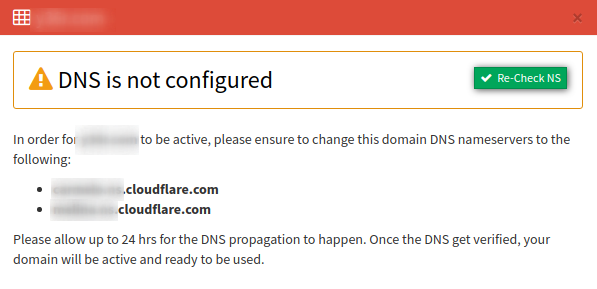](https://phonexa-4703e840ef03.intercom-attachments-1.com/i/o/330554579/7bc08b78343941d992fa5de4/recheck-202-20domains-20tab.png)
After the propagation of the NS record, the **“Inactive”** domain status will change to the **“Active”** status, the record in the domains list turns from grey to green color, and the shortened domain becomes available to use.
- [General information](https://support.phonexa.com/general-information?hsLang=en#main-content)
- [Account Settings](https://support.phonexa.com/general-information?hsLang=en#account-settings)
- [Security Settings](https://support.phonexa.com/general-information?hsLang=en#security-settings)
- [Users](https://support.phonexa.com/general-information?hsLang=en#users)
- [System Customization](https://support.phonexa.com/general-information?hsLang=en#system-customization)
- [Project Customization](https://support.phonexa.com/general-information?hsLang=en#project-customization)
- [Product Customization](https://support.phonexa.com/general-information?hsLang=en#product-customization)
- [System Management](https://support.phonexa.com/general-information?hsLang=en#system-management)
- [Support](https://support.phonexa.com/general-information?hsLang=en#support)
- [LMS Sync & Call Logic](https://support.phonexa.com/lms-sync-call-logic?hsLang=en#main-content)
- [Extra Features](https://support.phonexa.com/lms-sync-call-logic?hsLang=en#extra-features)
- [Publisher Configuration](https://support.phonexa.com/lms-sync-call-logic?hsLang=en#publisher-configuration)
- [Client Management](https://support.phonexa.com/lms-sync-call-logic?hsLang=en#client-management)
- [System Logs](https://support.phonexa.com/lms-sync-call-logic?hsLang=en#system-logs)
- [Documents And References](https://support.phonexa.com/lms-sync-call-logic?hsLang=en#documents-and-references)
- [Reports and Analytics](https://support.phonexa.com/lms-sync-call-logic?hsLang=en#reports-and-analytics)
- [Publisher management](https://support.phonexa.com/lms-sync-call-logic?hsLang=en#publisher-management)
- [Call Logic Customization](https://support.phonexa.com/lms-sync-call-logic?hsLang=en#call-logic-customization)
- [Campaign Configuration](https://support.phonexa.com/lms-sync-call-logic?hsLang=en#campaign-configuration)
- [Feed CMS](https://support.phonexa.com/lms-sync-call-logic?hsLang=en#feed-cms)
- [Event Tracking](https://support.phonexa.com/lms-sync-call-logic?hsLang=en#event-tracking)
- [iClear](https://support.phonexa.com/lms-sync-call-logic?hsLang=en#iclear)
- [E-Delivery](https://support.phonexa.com/e-delivery?hsLang=en#main-content)
- [List Management](https://support.phonexa.com/e-delivery?hsLang=en#list-management)
- [Email Campaigns](https://support.phonexa.com/e-delivery?hsLang=en#email-campaigns)
- [SMS Campaigns](https://support.phonexa.com/e-delivery?hsLang=en#sms-campaigns)
- [Reports](https://support.phonexa.com/e-delivery?hsLang=en#reports)
- [Suppression Management](https://support.phonexa.com/e-delivery?hsLang=en#suppression-management)
- [Books360](https://support.phonexa.com/books360?hsLang=en#main-content)
- [Books 360 Integration](https://support.phonexa.com/books360?hsLang=en#books-360-integration)
- [Vendor Management](https://support.phonexa.com/books360?hsLang=en#vendor-management)
- [Account](https://support.phonexa.com/books360?hsLang=en#account)
- [Customer Management](https://support.phonexa.com/books360?hsLang=en#customer-management)
- [Opt-Intel](https://support.phonexa.com/opt-intel?hsLang=en#main-content)
- [List Management](https://support.phonexa.com/opt-intel?hsLang=en#list-management)
- [All Reports](https://support.phonexa.com/opt-intel?hsLang=en#all-reports)
- [Mailers](https://support.phonexa.com/opt-intel?hsLang=en#mailers)
- [Campaigns](https://support.phonexa.com/opt-intel?hsLang=en#campaigns)
- [System Management](https://support.phonexa.com/opt-intel?hsLang=en#system-management)
- [HitMetrix](https://support.phonexa.com/hitmetrix?hsLang=en#main-content)
- [Analytics](https://support.phonexa.com/hitmetrix?hsLang=en#analytics)
- [Heatmaps](https://support.phonexa.com/hitmetrix?hsLang=en#heatmaps)
- [System Management](https://support.phonexa.com/hitmetrix?hsLang=en#system-management)
- [Lynx](https://support.phonexa.com/lynx?hsLang=en#main-content)
- [Offers](https://support.phonexa.com/lynx?hsLang=en#offers)
- [LYNX Reports](https://support.phonexa.com/lynx?hsLang=en#lynx-reports)
- [Advertisers](https://support.phonexa.com/lynx?hsLang=en#advertisers)
- [Affiliates](https://support.phonexa.com/lynx?hsLang=en#affiliates)
- [Account Settings](https://support.phonexa.com/lynx?hsLang=en#account-settings)
- [Cloud PBX](https://support.phonexa.com/cloud-pbx?hsLang=en)
[](https://phonexa.com/?hsLang=en)
Phonexa Knowledge Base
Copyright © 2026, Phonexa