---
title: Tickets
description: Learn how to submit a support ticket and get the assistance you need.
---
[Skip to content](https://support.phonexa.com/tickets#main-content)
[](https://support.phonexa.com/?hsLang=en)
Open main navigation
Close main navigation
- [➜\]](https://phonexa.com/)
[➜\]](https://phonexa.com/?hsLang=en)
Phonexa Support Center
- There are no suggestions because the search field is empty.
1. [Knowledge Base](https://support.phonexa.com/?hsLang=en)
2. [General information](https://support.phonexa.com/general-information?hsLang=en)
3. [Support](https://support.phonexa.com/general-information?hsLang=en#support)
# Tickets
## Learn how to submit a support ticket and get the assistance you need.
**Tickets** are support requests you send to our team. Once submitted, we’ll track the issue and respond with help or a resolution. You can create a new ticket or manage the existing one.
*Note: These tickets will be created and available only inside the Phonexa system.*
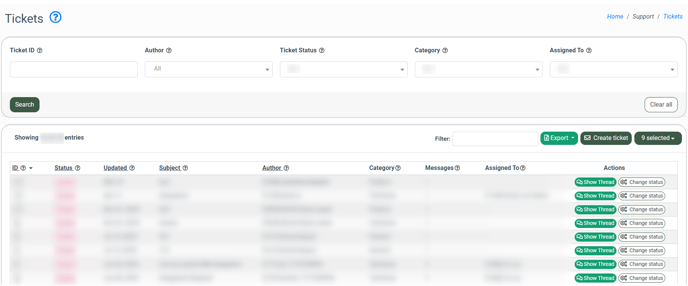
To view the list of available tickets, go to the **Support \> Tickets** section.
[](https://support.phonexa.com/hubfs/Tickets%201-1.png?hsLang=en)
You can narrow down the search results by using the following filters:
- **Ticket ID:** Enter the unique identification number of the ticket.
- **Author:** Select the user who created the ticket.
- **Ticket Status:** Select the ongoing status of the ticket *(Closed, In Progress, New).*
- **Category:** Select the category to which the ticket is related.
- **Assigned To:** Select the manager that is assigned to the particular ticket.
The list of available tickets contains the following information:
- **ID:** The unique identification number of the ticket.
- **Status:** The ongoing status of the ticket.
- **Updated:** The date and time of the last update received on the ticket.
- **Subject:** The subject of the issue described in the ticket.
- **Author:** The name of the user who created the ticket.
- **Category:** The name of the category that is attached to the ticket.
- **Messages:** The number of messages left in the ticket thread.
- **Assigned To:** The name of the manager to whom the ticket is assigned.
To create a new ticket, click the **“Create ticket”** button and fill in the following fields in the **“Create ticket”** pop-up window:
- **Category:** Select the category to which the ticket is related.
- **Assigned To:** Select the manager for the ticket assignment.
- **Subject:** Enter the subject of the issue described in the ticket.
- **Message:** Enter the text message of the ticket.
Click the **“Send”** button to complete the ticket creation.
[](https://support.phonexa.com/hubfs/Tickets%202-1.png?hsLang=en)
To edit the ticket status, click the **“Change status”** button in the **“Actions”** column and fill in the data fields in the **“Change status”** pop-up window.
- **Status:** Change the ongoing status of the ticket.
- **Category:** Change the category to which the ticket is related.
- **Assigned To:** Change the manager that is assigned to the particular ticket.
Click the **“Save”** button to complete the changes.
[](https://support.phonexa.com/hubfs/Tickets%203-1.png?hsLang=en)
To view and manage the detailed information about the ticket, click the **“Show Thread”** button in the **“Actions”** column.
You will be redirected to the **“Support Ticket”** section. You can view the name of the ticket creator, the total number of messages left during the ticket processing, and the ongoing status of the ticket.
Below, you can view a thread of the messages that were left during the ticket processing, along with the system actions that were performed on the particular ticket.
[](https://support.phonexa.com/hubfs/Tickets%204-1.png?hsLang=en)
To change the ongoing status of the ticket, click the **“Change ticket status”** button, fill in the required fields in the **“Change ticket status”** pop-up window, and click the **“Save”** button to complete the changes.
[](https://support.phonexa.com/hubfs/Tickets%205-1.png?hsLang=en)
To leave a new reply on the ongoing ticket, click the **“Reply”** button, fill in the reply text in the **“Message”** field of the **“Reply”** pop-up window, and click the **“Send”** button to complete the action.
[](https://support.phonexa.com/hubfs/Tickets%206.png?hsLang=en)
*Note: If you leave a new reply in the created ticket with the* ***“New”*** *status after the reply is sent, the ongoing ticket status will be changed to* ***“In Progress”.***
[](https://support.phonexa.com/hubfs/Tickets%207-1.png?hsLang=en)
To go back to the list of available tickets, click the **“Back to Tickets List”** button.
To export the list of available tickets as a CSV file, click the **“Export”** button and select the export option.
- [General information](https://support.phonexa.com/general-information?hsLang=en#main-content)
- [Account Settings](https://support.phonexa.com/general-information?hsLang=en#account-settings)
- [Security Settings](https://support.phonexa.com/general-information?hsLang=en#security-settings)
- [Users](https://support.phonexa.com/general-information?hsLang=en#users)
- [System Customization](https://support.phonexa.com/general-information?hsLang=en#system-customization)
- [Project Customization](https://support.phonexa.com/general-information?hsLang=en#project-customization)
- [Product Customization](https://support.phonexa.com/general-information?hsLang=en#product-customization)
- [System Management](https://support.phonexa.com/general-information?hsLang=en#system-management)
- [Support](https://support.phonexa.com/general-information?hsLang=en#support)
- [LMS Sync & Call Logic](https://support.phonexa.com/lms-sync-call-logic?hsLang=en#main-content)
- [Extra Features](https://support.phonexa.com/lms-sync-call-logic?hsLang=en#extra-features)
- [Publisher Configuration](https://support.phonexa.com/lms-sync-call-logic?hsLang=en#publisher-configuration)
- [Client Management](https://support.phonexa.com/lms-sync-call-logic?hsLang=en#client-management)
- [System Logs](https://support.phonexa.com/lms-sync-call-logic?hsLang=en#system-logs)
- [Documents And References](https://support.phonexa.com/lms-sync-call-logic?hsLang=en#documents-and-references)
- [Reports and Analytics](https://support.phonexa.com/lms-sync-call-logic?hsLang=en#reports-and-analytics)
- [Publisher management](https://support.phonexa.com/lms-sync-call-logic?hsLang=en#publisher-management)
- [Call Logic Customization](https://support.phonexa.com/lms-sync-call-logic?hsLang=en#call-logic-customization)
- [Campaign Configuration](https://support.phonexa.com/lms-sync-call-logic?hsLang=en#campaign-configuration)
- [Feed CMS](https://support.phonexa.com/lms-sync-call-logic?hsLang=en#feed-cms)
- [Event Tracking](https://support.phonexa.com/lms-sync-call-logic?hsLang=en#event-tracking)
- [iClear](https://support.phonexa.com/lms-sync-call-logic?hsLang=en#iclear)
- [Troubleshooting Guides](https://support.phonexa.com/lms-sync-call-logic?hsLang=en#troubleshooting-guides)
- [E-Delivery](https://support.phonexa.com/e-delivery?hsLang=en#main-content)
- [List Management](https://support.phonexa.com/e-delivery?hsLang=en#list-management)
- [Email Campaigns](https://support.phonexa.com/e-delivery?hsLang=en#email-campaigns)
- [SMS Campaigns](https://support.phonexa.com/e-delivery?hsLang=en#sms-campaigns)
- [Reports](https://support.phonexa.com/e-delivery?hsLang=en#reports)
- [Suppression Management](https://support.phonexa.com/e-delivery?hsLang=en#suppression-management)
- [Books360](https://support.phonexa.com/books360?hsLang=en#main-content)
- [Books 360 Integration](https://support.phonexa.com/books360?hsLang=en#books-360-integration)
- [Vendor Management](https://support.phonexa.com/books360?hsLang=en#vendor-management)
- [Account](https://support.phonexa.com/books360?hsLang=en#account)
- [Customer Management](https://support.phonexa.com/books360?hsLang=en#customer-management)
- [Opt-Intel](https://support.phonexa.com/opt-intel?hsLang=en#main-content)
- [List Management](https://support.phonexa.com/opt-intel?hsLang=en#list-management)
- [All Reports](https://support.phonexa.com/opt-intel?hsLang=en#all-reports)
- [Mailers](https://support.phonexa.com/opt-intel?hsLang=en#mailers)
- [Campaigns](https://support.phonexa.com/opt-intel?hsLang=en#campaigns)
- [System Management](https://support.phonexa.com/opt-intel?hsLang=en#system-management)
- [HitMetrix](https://support.phonexa.com/hitmetrix?hsLang=en#main-content)
- [Analytics](https://support.phonexa.com/hitmetrix?hsLang=en#analytics)
- [Heatmaps](https://support.phonexa.com/hitmetrix?hsLang=en#heatmaps)
- [System Management](https://support.phonexa.com/hitmetrix?hsLang=en#system-management)
- [Lynx](https://support.phonexa.com/lynx?hsLang=en#main-content)
- [Offers](https://support.phonexa.com/lynx?hsLang=en#offers)
- [LYNX Reports](https://support.phonexa.com/lynx?hsLang=en#lynx-reports)
- [Advertisers](https://support.phonexa.com/lynx?hsLang=en#advertisers)
- [Affiliates](https://support.phonexa.com/lynx?hsLang=en#affiliates)
- [Account Settings](https://support.phonexa.com/lynx?hsLang=en#account-settings)
- [Cloud PBX](https://support.phonexa.com/cloud-pbx?hsLang=en)
[](https://phonexa.com/?hsLang=en)
Phonexa Knowledge Base
Copyright © 2026, Phonexa