
This section allows you to quickly identify whether the user with the provided contact information is available in the system, check the respective email or phone number of the user, and verify the system role that is assigned to the user.
This approach simplifies the search through the different system sections where the users with the different system roles are displayed, such as the list of Employees, Publishers, Buyers, and more.
Note: This section is available only for users with the Global Admin system role.
To view this section, go to the Global Dashboard > System Users > User Lookup section.
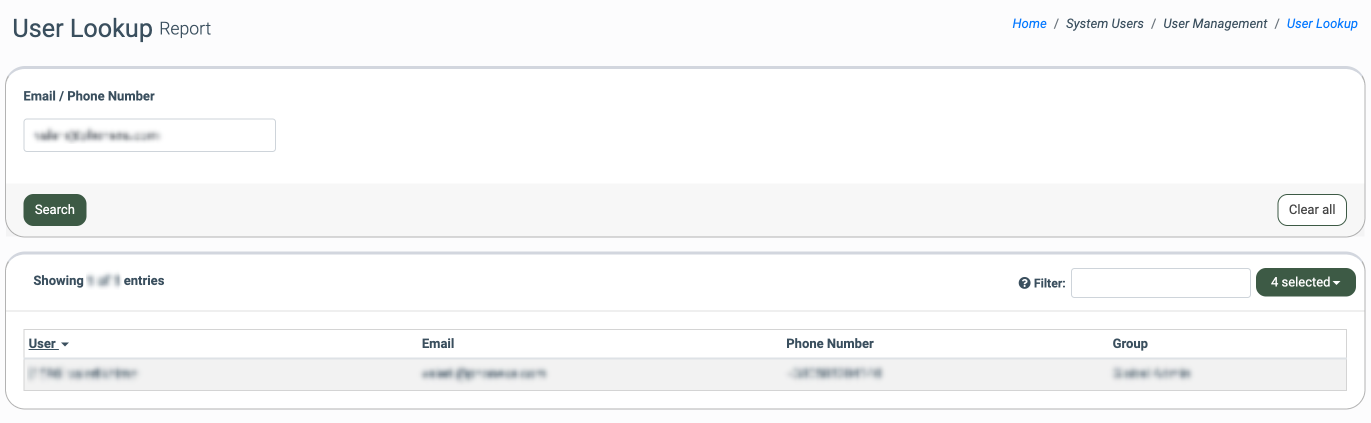
Enter the user’s email address or phone number and click the “Search” button to browse through the system users.
The list of the search result is the users exists in the system contains the following information:
- User: The nickname of the user.
- Email: The email address that is associated with the user.
- Phone Number: The phone number that is associated with the user.
- Group: The system role(s) that are assigned to the user. To view the list of all system roles that are assigned to the particular user, click the arrow button. The list of all system roles will be displayed in the drop-down list.