
The Publisher Settings section allows administrators to configure system-level settings for how publishers (affiliates) interact with the LMS and Call Logic components, including registration setup, access to reporting data, phone number management, and source and channel approval workflows.
Best Practices
- Enable manual approval for new publishers to maintain quality
- Use source and channel approval to prevent low-quality traffic
- Limit sensitive data visibility (e.g., caller ID) for compliance
- Configure duplicate logic to avoid overpaying
To view and edit publisher settings in the system, go to System Management > General > Project Settings section, then select the “LMS & Call Logic” tab and the “Publisher Settings” subtab.
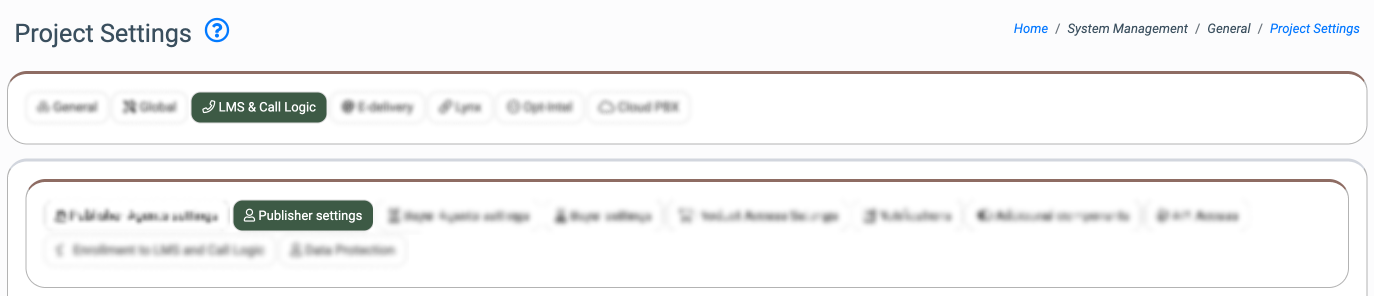
The settings are splitted in the following blocks:
- General Settings
- Registration Process
- Extend Publisher Permissions (Reports)
- Extend Publisher Permissions (Manipulation)
- Source Approval
- Channel Approval
- Duplicate Payment Settings
- Publisher Tools
General Settings
The “General Settings” block defines default behaviors for publishers across the system.
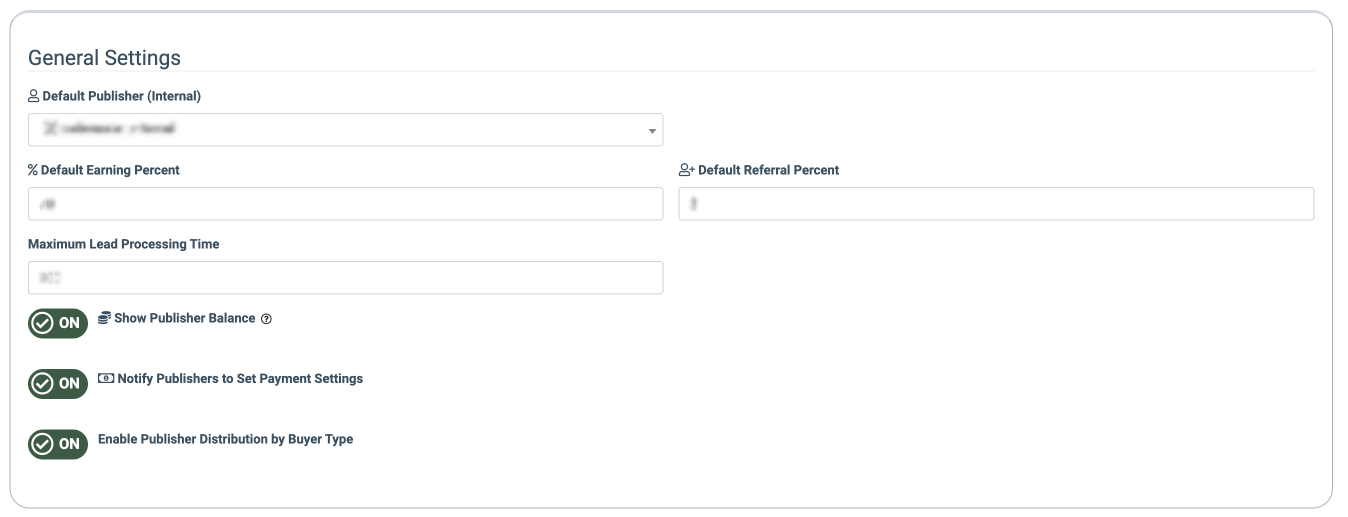
The following settings are available:
- Default Publisher (Internal): Assign a default internal Publisher that is used to attribute organic, testing, or system‑generated traffic across LMS and Call Logic. The internal Publisher will be assigned to the test leads that were sent via the Test Lead feature for testing purposes. The internal Publisher is an internal system user who can be used as a fallback in cases where the external publisher is not involved. This makes it easy to include or exclude such activity in analytics and reports, supporting clear tracking and reliable data management.
- Default Earning Percent: Sets the default system’s revenue share (%) for Publishers. Note: The rev-share set at the Publisher’s level overrides the ongoing setting.
- Default Referral Percent: Defines commission for referral-based publisher relationships, defining the default referral earnings for referral publishers.
- Maximum Lead Processing Time: Sets the maximum duration (in seconds) allowed for lead processing within the same transaction before timing out.
- Show Publisher Balance: Select the option (On / Off) to display/hide the Publisher Balance Widget on the Dashboard. Read more about the LMS and Call Logic Dashboard in the Knowledge Base article.
- Notify Publishers to Set Payment Settings: Determines whether publishers are prompted to configure payout details.
- Enable Publisher Distribution by Buyer Type: Switch the toggle to the “On” position to enable the Publisher distribution according to the Buyer Type. The feature allows you to choose which Buyers can receive traffic from a particular Publisher based on their Buyer Types.
Registration Process
The “Registration Process” block controls how publishers register and onboard into the platform. It includes settings that allow you to customize the publisher registration process.
Read more about the Global Registration process and Publisher Registration settings in the following Knowledge Base article.
Extend Publisher Permissions (Reports)
The “Extend Publisher Permissions (Reports)” block allows you to control which data is available to publishers in reports.
Note: These settings are applicable only to the reports of the Call Logic component.
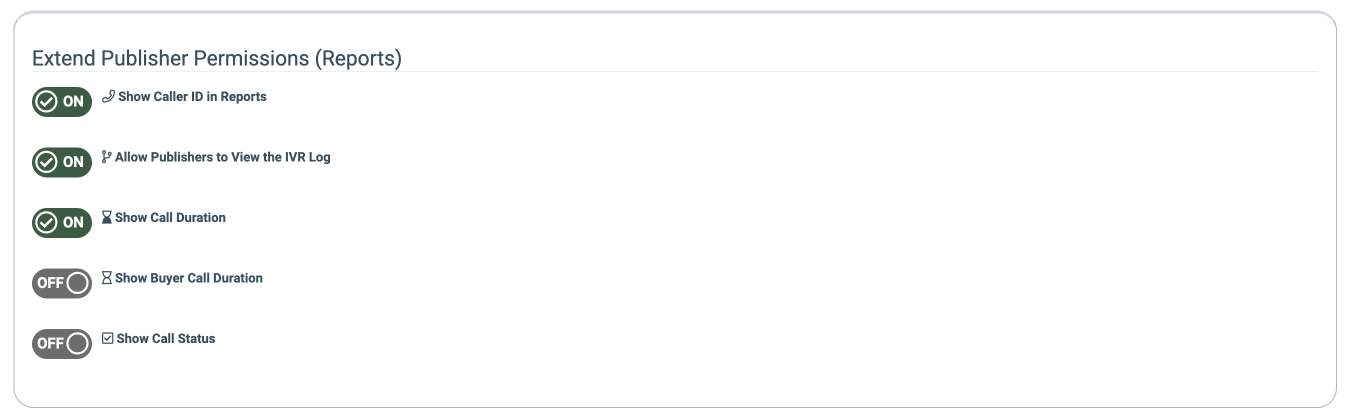
- Show Caller ID in Reports: Allows publishers to view the caller’s phone number in reports.
- Allow Publishers to View the IVR Log: Provides access to the IVR log data and interaction details in reports.
- Show Call Duration: Displays the total duration of each call in reports.
- Show Buyer Call Duration: Displays the duration of the call after it is connected to the buyer.
- Show Call Status: Shows the call statuses of each call in reports.
Extend Publisher Permissions (Manipulation)
The “Extend Publisher Permissions (Manipulation)” block allows you to extend the operations that Publishers can perform, such as managing their existing phone numbers and reserving new numbers. Also, an available option to limit the number of phone numbers that can be reserved by the Publisher.
Use Case: The system administrator wants to delegate phone number management processes directly to Publishers. By configuring the Extend Publisher Permissions (Manipulation) settings, the administrator grants Publishers access to manage and modify their currently assigned numbers, as well as reserve new, available numbers for future usage. To control the system's phone number reservation, the administrator sets a limit on the maximum number of new reservations each Publisher is allowed to make.
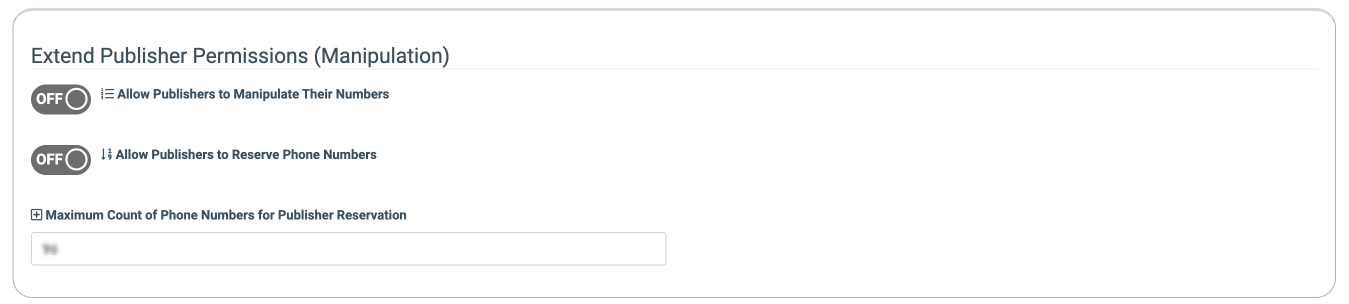
- Allow Publishers To Manipulate Their Numbers: Allows publishers to manage and modify their assigned phone numbers.
- Allow Publishers to Reserve Phone Numbers: Enables publishers to reserve available phone numbers for future use.
- Maximum Count Of Phone Numbers For Publisher Reservation: Defines the maximum number of phone numbers a publisher can reserve.
Source Approval
The “Source Approval” block controls how new traffic sources are handled within the components. It allows you to define the default status of newly created sources and determine whether approval is required before they can start submitting traffic. This helps ensure traffic quality, prevent unauthorized activity, and maintain compliance.
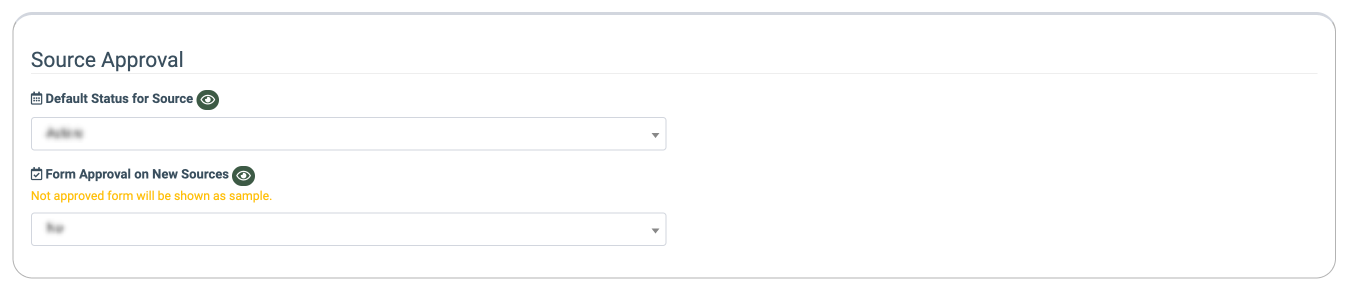
- Default Status For Source: Sets the default status for newly created publisher sources (Active, Disabled, Test).
- Form Approval on New Sources: Enables or disables manual approval of forms for newly created sources. Forms that are not approved will be marked as “Sample” and will not be active. The “Log Only” option allows you to log the data about the form approval processing in the JS Form Check report, but does not require the approval itself, and the “Sample” status will not be applied to forms. Read more about the JS Form Check report in the following Knowledge Base article.
Channel Approval
The “Channel Approval” block defines the default status for different traffic channels, such as form (web leads), call (inbound calls), and post (API submissions). It allows you to control whether each channel is active by default, helping you manage traffic flow and enforce approval processes across multiple publisher channels with different posting methods.
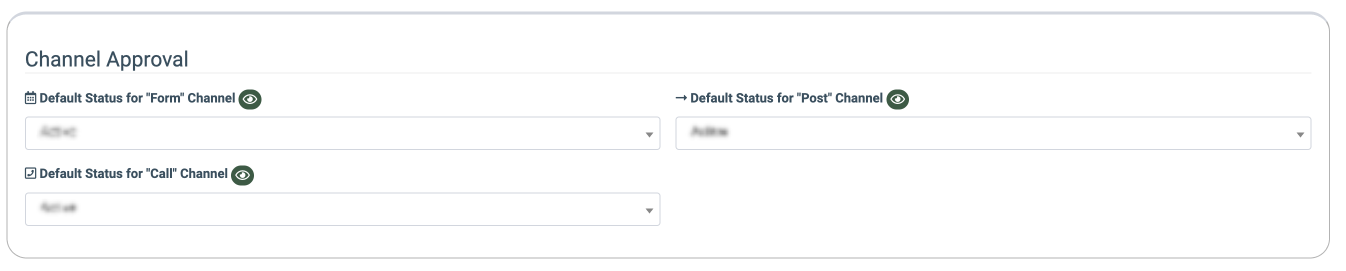
- Default Status for "Form" Channel: Sets the default status assigned to the Publisher’s Channel with the FORM posting method (Active, Disabled, Test).
- Default Status for "Post" Channel: Sets the default status assigned to the Publisher’s Channel with the POST (API-based) posting method (Active, Disabled, Test).
- Default Status for "Call" Channel: Sets the default status assigned to the Publisher’s Channel with the CALL posting method (Active, Disabled, Test).
Duplicate Payment Settings
The "Duplicate Payment Settings” block prevents payouts to publishers for duplicate leads submitted within the specified number of days.
Note: This option is available on demand. Please contact your account manager to enable the report.

- Do Not Pay Publishers for Duplicates Within Last X Days: Sets the number of days within which the Publisher will not be paid for duplicates.
Publisher Tools
The “Publisher Tools” block allows you to set up additional tools for Publishers.
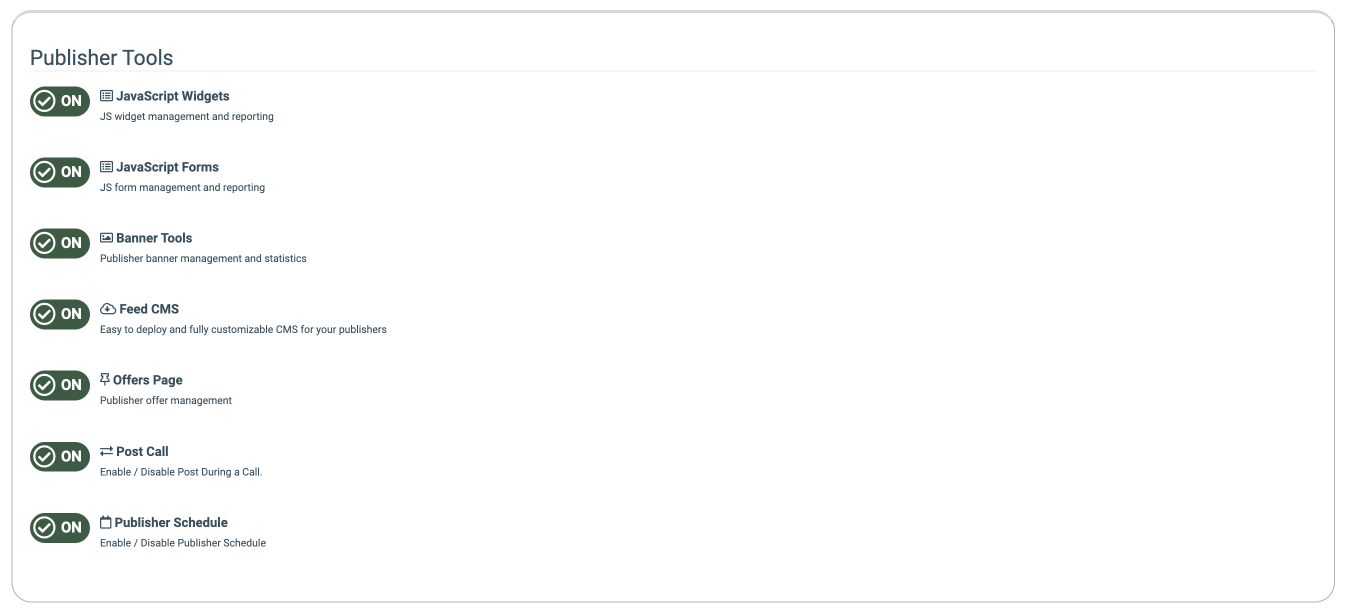
The following settings are available:
- JavaScript Widgets: Switch the toggle to the “On” position to enable JavaScript widget management and reporting in the system. JavaScript widgets are embeddable scripts that render interactive components on external or internal web pages while sending structured data back to LMS & Call Logic. This setting allows or disables the usage of such options as Call Tracking Pool widgets, JS Forms, and website widgets, and the corresponding reporting. The Call Tracking Pool widgets rotate phone numbers per session or visitor, collect device, geo, and source information, and log each “session” for attribution. The JS Forms are created with templates tied to specific products and publishers and embedded by copying a JS snippet.
- JavaScript Forms: Switch the toggle to the “On” position to enable JavaScript form management and reporting in the system. The JS Forms are created with templates tied to specific products and publishers and embedded by copying a JS snippet. This option allows creating the JS form using available templates according to existing Products in your system, viewing the settings, editing and customizing the existing JS Form, and checking the additional features.
- Banner Tools: Switch the toggle to the “On” position to enable Publisher Banner management and reporting in the system. Banners can be used to turn website traffic into income, advertise your business on other resources, and let people know about you in general. Banner management allows you to standardize banner creatives for publishers, measure banner engagement metrics, and enforce brand and compliance consistency.
- Feed CMS: Switch the toggle to the “On” position to enable a fully customizable CMS for your publishers. Feed CMS is a template‑driven site builder for publisher landing pages. Templates define the structure, layout, and reusable design blocks used by one or more feeds. The templates can be made public (visible to all publishers) or remain internal. This allows publishers to create a set of templates and then allows publishers to use feeds without writing code.
- Offers Page: Switch the toggle to the “On” position to enable the offers page. The Offers page displays all public feeds and forms, as well as descriptions of the Offers. This Offers page contains the publisher‑facing offers catalog, including the public feeds and forms, as well as descriptions of the Offers. You can use the Offers section to create an offer for the Publishers to bring traffic to the form.
- Post Call: Switch the toggle to the “On” position to enable the post calls feature. The Post Call option allows the Buyer and Publisher to receive lead data during or after the call. The Post Call allows you to send and receive structured lead data during or after a phone call via the Call Logic component, Cloud PBX component, and external buyer APIs. Post Call integrations at the buyer and campaign level check the information from the Lead Stash for data retrieval, and support advanced flows such as Ping‑Post Call and bundled Ping Post Calls.
- Publisher Schedule: Switch the toggle to the “On” position to enable the Publisher Schedule. The Publisher Schedule is used to control when web leads from Publishers can enter the system. This feature can be used for business hours gating, Product‑specific time ranges, adjustment according to the time zone. The feature provides time‑based control over when specific publishers can send traffic, especially across multiple products and channels, and optimizes performance by limiting intake to hours and days with proven high conversion, based on reporting.