---
title: Lead Settings
description: The “Lead Settings” tab of the Lead Details section allows you to view general information about the lead processing that is displayed as the name of the settings and the corresponding value.
---
[Skip to content](https://support.phonexa.com/lead-settings#main-content)
[](https://support.phonexa.com/?hsLang=en)
Open main navigation
Close main navigation
- [➜\]](https://phonexa.com/)
[➜\]](https://phonexa.com/?hsLang=en)
Phonexa Support Center
- There are no suggestions because the search field is empty.
1. [Knowledge Base](https://support.phonexa.com/?hsLang=en)
2. [LMS Sync & Call Logic](https://support.phonexa.com/lms-sync-call-logic?hsLang=en)
3. [Reports and Analytics](https://support.phonexa.com/lms-sync-call-logic?hsLang=en#reports-and-analytics)
# Lead Settings
## The “Lead Settings” tab of the Lead Details section allows you to view general information about the lead processing that is displayed as the name of the settings and the corresponding value.
This information includes min price of the lead, the buyer’s offer price, the processing time of the lead, the current amount of the buyer’s balance (in case of the prepaid buyer option usage), the approach of the lead processing (via the PingTree or directly via the specific campaign), etc.
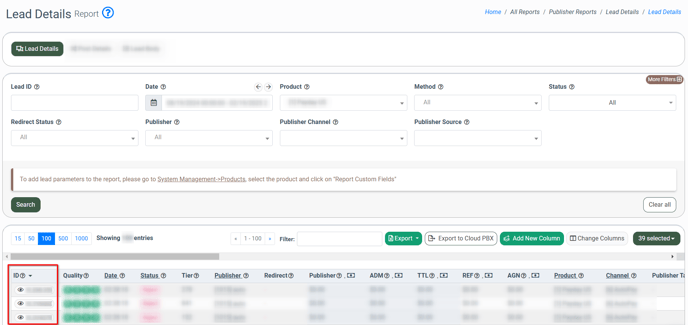
To view these details, select the **LMS** or **Call Logic** component respectively, go to the **Publisher** or **Buer Reports \> Lead Details** section, select the corresponding lead from the list, and click the **“Lead ID”** button in the **“ID”** column.
*Read more about the Publisher Lead Details report in the following Knowledge Base* [*article*](https://support.phonexa.com/publisher-reports-lead-details?hsLang=en)*.*
*Read more about the Buyer Lead Details report in the following Knowledge Base* [*article*](https://support.phonexa.com/buyer-report-lead-details?hsLang=en)*.*
[](https://support.phonexa.com/hubfs/Lead%20Settings%201.png?hsLang=en)
You will be redirected to the **“Lead Info”** section, where you need to select the **“Lead Settings”** tab.
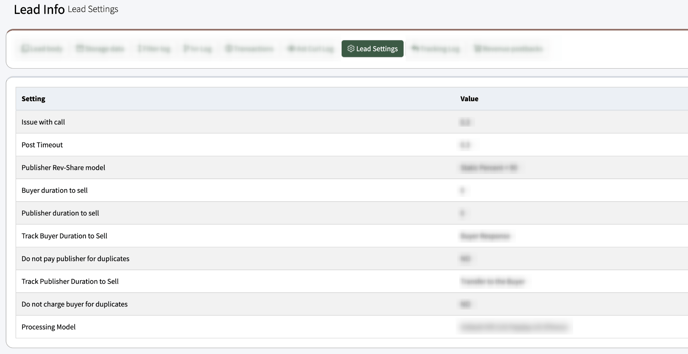
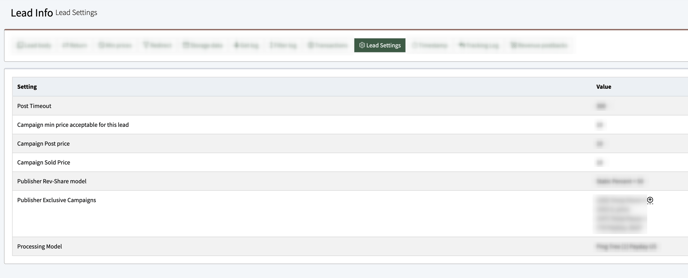
The list of processing settings applied to the lead contains the following information:
- **Setting:** The name of the applied processing setting. *Note: The number and names of the applied settings may vary depending on ongoing system settings.*
- **Value:** The particular value of the applied processing setting.
The list of applied settings may contain the following options:
- **Issue with call (Call Logic only):** The option will be assigned to the lead when the call is processed unsuccessfully, along with the timeout value.
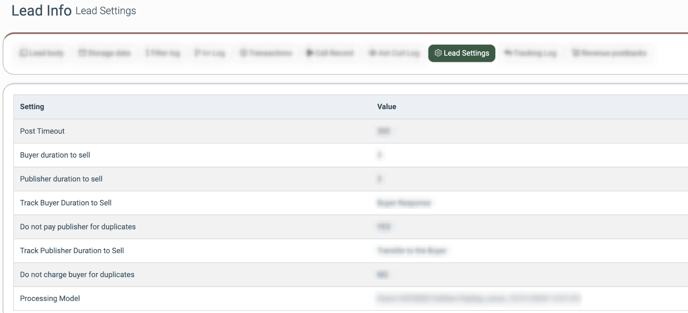
- **Post Timeout:** The timeout of the lead posting.
- **Buyer duration to sell (Call Logic only):** The time of the buyer’s duration to sell. *Read more about the Duration to Sell setting in the following Knowledge Base* [*article*](https://support.phonexa.com/duration-to-sell-advanced?hsLang=en)*.*
- **Publisher duration to sell (Call Logic only):** The time of the publisher’s duration to sell.
- **Track Publisher Duration to Sell (Call Logic only):** The current status of the publisher’s duration to sell tracking option.
- **Track Buyer Duration to Sell (Call Logic only):** The current status of the buyer’s duration to sell tracking option.
- **Do not pay publisher for duplicates:** The current status of the **“Do Not Pay Publishers For Duplicates Within Last X Days”** option. *Read more about this option in the following Knowledge Base* [*article*](https://support.phonexa.com/do-not-pay-publishers-for-duplicates?hsLang=en)*.*
- **Do not pay buyer for duplicates:** The current status of the **“Do Not Charge Buyers For Duplicates Within Last X Days”** option. *Read more about this option in the following Knowledge Base* [*article*](https://support.phonexa.com/do-not-charge-buyers-for-duplicates?hsLang=en)*.*
[](https://support.phonexa.com/hubfs/Lead%20Settings%202.png?hsLang=en)
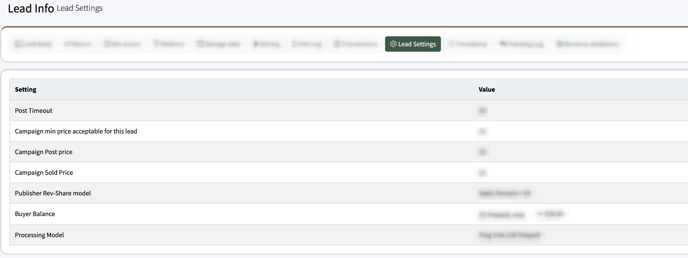
- **Campaign min price acceptable for this lead:** The min price for the lead that should be offered from the particular campaign.
- **Campaign Post price:** The price with which the lead was posted on the particular campaign.
- **Campaign Sold price:** The price with which the lead was sold on the particular campaign.
- **Publisher Rev-Share model:** The name of the Rev-Share model that is applied to the corresponding Publisher, along with the set percentage ratio. *Read more about the Publisher’s Rev-Share model in the following Knowledge Base* [*article*](https://support.phonexa.com/publisher-management-rev-share-tab?hsLang=en)*.*
- **Publisher Exclusive Campaigns:** The name(s) of the Exclusive Campaigns that were set for the Publisher through which the lead was processed. *Note: Only active Exclusive Campaigns will be displayed in the ongoing field.* To view the list of Exclusive Campaigns, click the expand arrow-down button. *Read more about the Publisher Exclusive Campaigns feature in the following Knowledge Base [article](https://support.phonexa.com/publisher-configuration-exclusive-campaigns?hsLang=en).*
- **Buyer Balance:** The amount of the Prepaid Buyer balance before the processing of the current lead, along with the name of the Buyer. *Read more about the Prepaid Buyer option in the following Knowledge Base* [*article*](https://support.phonexa.com/prepaid-buyer-option?hsLang=en)*.*
- **Processing Model:** The information about the processing model that was applied to the lead (via *PingTree, Campaign, Direct IVR,* etc.).
[](https://support.phonexa.com/hubfs/Lead%20Settings%203.png?hsLang=en)
[](https://support.phonexa.com/hubfs/Lead%20Settings%204.png?hsLang=en)
[](https://support.phonexa.com/hubfs/Lead%20Settings%205.png?hsLang=en)
[](https://support.phonexa.com/hubfs/Lead%20Settings%206.png?hsLang=en)
- [General information](https://support.phonexa.com/general-information?hsLang=en#main-content)
- [Account Settings](https://support.phonexa.com/general-information?hsLang=en#account-settings)
- [Security Settings](https://support.phonexa.com/general-information?hsLang=en#security-settings)
- [Users](https://support.phonexa.com/general-information?hsLang=en#users)
- [System Customization](https://support.phonexa.com/general-information?hsLang=en#system-customization)
- [Project Customization](https://support.phonexa.com/general-information?hsLang=en#project-customization)
- [Product Customization](https://support.phonexa.com/general-information?hsLang=en#product-customization)
- [System Management](https://support.phonexa.com/general-information?hsLang=en#system-management)
- [Support](https://support.phonexa.com/general-information?hsLang=en#support)
- [LMS Sync & Call Logic](https://support.phonexa.com/lms-sync-call-logic?hsLang=en#main-content)
- [Extra Features](https://support.phonexa.com/lms-sync-call-logic?hsLang=en#extra-features)
- [Publisher Configuration](https://support.phonexa.com/lms-sync-call-logic?hsLang=en#publisher-configuration)
- [Client Management](https://support.phonexa.com/lms-sync-call-logic?hsLang=en#client-management)
- [System Logs](https://support.phonexa.com/lms-sync-call-logic?hsLang=en#system-logs)
- [Documents And References](https://support.phonexa.com/lms-sync-call-logic?hsLang=en#documents-and-references)
- [Reports and Analytics](https://support.phonexa.com/lms-sync-call-logic?hsLang=en#reports-and-analytics)
- [Publisher management](https://support.phonexa.com/lms-sync-call-logic?hsLang=en#publisher-management)
- [Call Logic Customization](https://support.phonexa.com/lms-sync-call-logic?hsLang=en#call-logic-customization)
- [Campaign Configuration](https://support.phonexa.com/lms-sync-call-logic?hsLang=en#campaign-configuration)
- [Feed CMS](https://support.phonexa.com/lms-sync-call-logic?hsLang=en#feed-cms)
- [Event Tracking](https://support.phonexa.com/lms-sync-call-logic?hsLang=en#event-tracking)
- [iClear](https://support.phonexa.com/lms-sync-call-logic?hsLang=en#iclear)
- [E-Delivery](https://support.phonexa.com/e-delivery?hsLang=en#main-content)
- [List Management](https://support.phonexa.com/e-delivery?hsLang=en#list-management)
- [Email Campaigns](https://support.phonexa.com/e-delivery?hsLang=en#email-campaigns)
- [SMS Campaigns](https://support.phonexa.com/e-delivery?hsLang=en#sms-campaigns)
- [Reports](https://support.phonexa.com/e-delivery?hsLang=en#reports)
- [Suppression Management](https://support.phonexa.com/e-delivery?hsLang=en#suppression-management)
- [Books360](https://support.phonexa.com/books360?hsLang=en#main-content)
- [Books 360 Integration](https://support.phonexa.com/books360?hsLang=en#books-360-integration)
- [Vendor Management](https://support.phonexa.com/books360?hsLang=en#vendor-management)
- [Account](https://support.phonexa.com/books360?hsLang=en#account)
- [Customer Management](https://support.phonexa.com/books360?hsLang=en#customer-management)
- [Opt-Intel](https://support.phonexa.com/opt-intel?hsLang=en#main-content)
- [List Management](https://support.phonexa.com/opt-intel?hsLang=en#list-management)
- [All Reports](https://support.phonexa.com/opt-intel?hsLang=en#all-reports)
- [Mailers](https://support.phonexa.com/opt-intel?hsLang=en#mailers)
- [Campaigns](https://support.phonexa.com/opt-intel?hsLang=en#campaigns)
- [System Management](https://support.phonexa.com/opt-intel?hsLang=en#system-management)
- [HitMetrix](https://support.phonexa.com/hitmetrix?hsLang=en#main-content)
- [Analytics](https://support.phonexa.com/hitmetrix?hsLang=en#analytics)
- [Heatmaps](https://support.phonexa.com/hitmetrix?hsLang=en#heatmaps)
- [System Management](https://support.phonexa.com/hitmetrix?hsLang=en#system-management)
- [Lynx](https://support.phonexa.com/lynx?hsLang=en#main-content)
- [Offers](https://support.phonexa.com/lynx?hsLang=en#offers)
- [LYNX Reports](https://support.phonexa.com/lynx?hsLang=en#lynx-reports)
- [Advertisers](https://support.phonexa.com/lynx?hsLang=en#advertisers)
- [Affiliates](https://support.phonexa.com/lynx?hsLang=en#affiliates)
- [Account Settings](https://support.phonexa.com/lynx?hsLang=en#account-settings)
- [Cloud PBX](https://support.phonexa.com/cloud-pbx?hsLang=en)
[](https://phonexa.com/?hsLang=en)
Phonexa Knowledge Base
Copyright © 2026, Phonexa